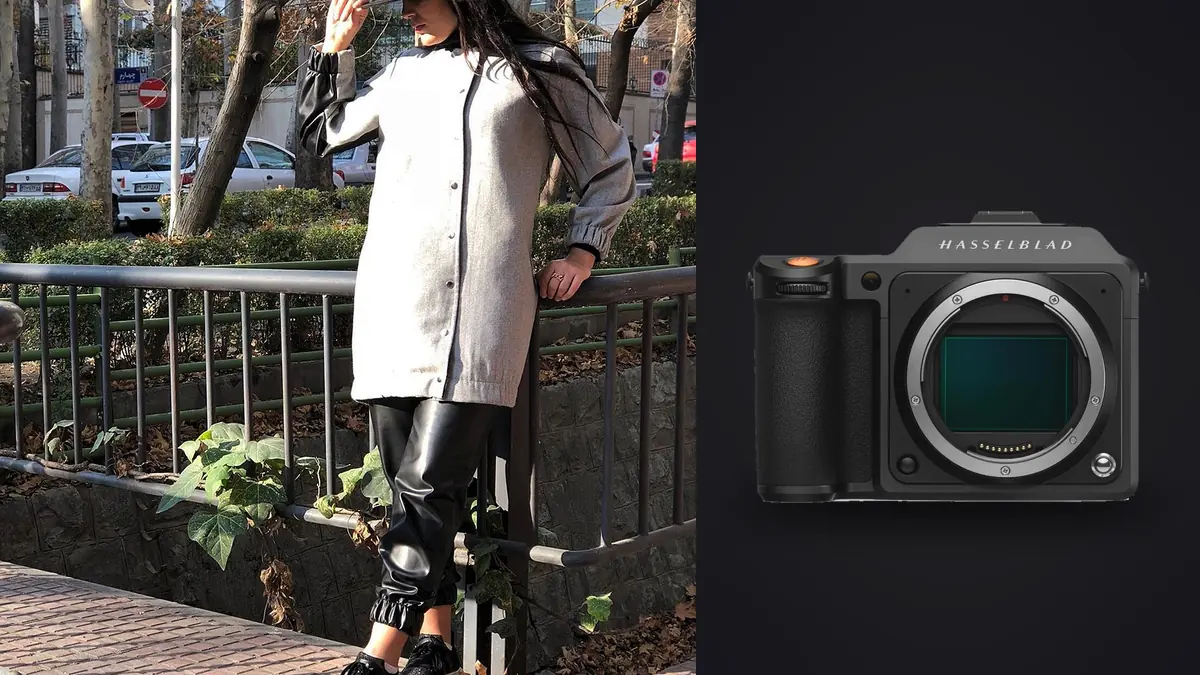
Why a lookbook client asked for medium format in the first place
The brief was straightforward on paper: eighteen looks, one model, a rented studio with a cyc wall in the morning and a rooftop location in the afternoon, deliverables due to the client's e-commerce team and their print catalog printer in the same week. What made the client insist on the Hasselblad X2D 100C wasn't resolution for its own sake. It was that the catalog printer wanted files that could survive a full-bleed double-page spread without upsampling, and the e-commerce team wanted to crop hard into a single garment detail without the image falling apart. Medium format solves both problems at once, and on this job it was the deciding factor over renting a second full-frame body.
What follows isn't a spec sheet rehash. It's what changed about the way the day was run, which lenses actually got used and why, where the camera slowed things down, and what happened to the roughly 3,400 raw frames once they left the memory card.
Building a lens kit around the shots you actually need
A lookbook day isn't one photograph repeated eighteen times. It's an opener that needs to feel editorial, a run of clean product-forward shots the client can drop straight into a product page, a handful of environmental frames for the brand's Instagram, and close crops on stitching, buttons, and fabric texture for anyone who wants to zoom in before buying. Four XCD lenses covered all of it, and each one had a specific job rather than being a general-purpose choice.
| Lens | 35mm-equivalent field of view | Max aperture | Role on this shoot |
|---|---|---|---|
| XCD 38V | ~30mm | f/2.5 | Rooftop environmental frames, wide enough to show the location without distorting the model at the edges of frame |
| XCD 55V | ~44mm | f/2.5 | The workhorse. Most of the clean, catalog-ready full-length looks were shot on this |
| XCD 90V | ~71mm | f/3.2 | Waist-up editorial frames where the client wanted compression and separation from the cyc |
| XCD 4/135V + converter | ~107mm | f/4.5 | Tight beauty crops and fabric detail shots for the e-commerce zoom feature |
The 55V did most of the heavy lifting, which tends to surprise people who expect a longer lens to dominate a fashion set. On a cyc wall with a fixed camera-to-subject distance, a mid-length XCD lens gave enough working room for an assistant to steam a hem or reposition a light without walking into frame, while still keeping the look flat and undistorted for cataloguing. The 90V came out for maybe a third of the frames, mostly when the art director wanted a tighter crop with visible falloff behind the model.
Tethering and keeping an art director happy on set
Commercial fashion work almost never happens without someone other than the photographer watching the monitor. On this job the art director and the client's brand manager sat behind a 27-inch reference display connected over USB-C, reviewing each capture as it landed rather than waiting for a break to check a memory card. The X2D 100C's tether speed over USB-C into Phocus was quick enough that a 100-megapixel file appeared full-screen within a couple of seconds of the shutter, which matters more than it sounds. A slow tether turns every review into a stall between looks, and on an eighteen-look day with a rented studio on the clock, those stalls add up to real money.
Where this earned its keep was catching problems immediately rather than in the edit. A visible pull in a jacket's shoulder seam, a reflection off a belt buckle, a stray thread, all of it got caught and fixed on set because the file was big enough to zoom into on the reference monitor and clean enough that nobody mistook a lighting artifact for a garment flaw. That's a different kind of value than resolution on the print side. It's resolution as a communication tool between the photographer, the stylist, and the client in the room.
Autofocus, burst rate, and what they mean when a model is moving
The X2D 100C's phase-detection autofocus is a real improvement over the contrast-only system in the X1D II, and for a lookbook shoot where the model holds a pose and adjusts on direction, it's fast enough not to be a problem. Where it starts to show its limits is walking shots. Ask a model to walk toward camera on a rooftop with wind moving fabric, and the X2D will hunt more than a mirrorless body built around sports and wildlife autofocus. The fix on this job was simple: block the walk into three fixed stopping points, focus-recompose at each, and treat any true walking-motion frame as a bonus rather than the plan.
Burst rate is the other adjustment. The X2D shoots a few frames per second, not the twenty-plus you'd get from a flagship full-frame body, and the buffer clears slower given the file sizes involved. That's not a flaw so much as a different way of shooting. On a controlled set, you don't need fifteen frames a second of a model holding a static pose. What it does mean is that catching a genuine candid moment, jewelry swinging, hair mid-flip, a laugh instead of a held expression, takes more discipline about timing the shutter release yourself rather than machine-gunning a burst and hoping.
Dynamic range from studio strobes to open rooftop sky
The morning studio segment was lit conventionally: two strip boxes and a beauty dish, metered and consistent, and the camera's dynamic range wasn't really tested. The afternoon rooftop segment is where it mattered. Shooting at 3pm with hard sun, a white garment against a bright sky and skin tone in shadow under a floppy hat brim is exactly the kind of range that clips highlights or crushes shadows on a smaller sensor. Pulling the shadows on the model's face two stops in post without banding, while the sky detail stayed intact, is where the sensor size earns its keep on location work.
Color out of camera is worth calling out separately from dynamic range. Hasselblad's color response handles skin tones without the slightly cool, slightly magenta cast some other systems need correcting on every single frame. For a lookbook with one model across eighteen looks and two lighting setups, that consistency compounds. Fewer adjustments per image, fewer inconsistencies between the studio batch and the rooftop batch, less back-and-forth with the client over a color match between the two locations.
What comes home: 3,400 raw files and the culling problem
Here's the part nobody puts in the marketing copy. A 100-megapixel 3FR file runs somewhere in the 100 to 200MB range depending on scene complexity, and a day that produces roughly 3,400 frames across eighteen looks, multiple angles, and safety duplicates for blinks, is comfortably north of half a terabyte before a single edit happens. That's before backups. Two card copies plus a drive copy on the way home from set is not optional at that file size, it's just how you avoid a disaster.
The bigger issue than storage is time. Culling 3,400 medium format frames by eye, at full resolution, on a laptop, is an evening lost before you've touched a single edit. This is where imagic actually changed how the evening after the shoot went. It scores focus locally on the raw files themselves, which matters a lot on a shoot where the 90V was wide open for separation and a soft-focus miss is easy to make on a moving model and easy to overlook on a laptop screen at less than full zoom. Running the take through its sharpness scoring flagged the frames where focus had drifted onto a shoulder or an earring instead of the eye, before any of them made it into a client-facing select.
The other piece that mattered was duplicate and burst clustering. Eighteen looks each shot at three or four stopping points, each stopping point with several safety frames, adds up to a lot of near-identical images. Rather than scrolling through them one by one, imagic groups the near-duplicates so picking the sharpest, best-expression frame out of a run of six becomes a five-second decision instead of a five-minute one. If you haven't used AI-assisted culling on a large shoot before, how AI photo culling works covers the mechanics in more detail than makes sense to repeat here.
Worth mentioning for anyone shooting unreleased campaign work under an NDA, which most commercial fashion lookbooks are: the culling happens entirely on the laptop, nothing gets uploaded anywhere to get sorted. For a client who hasn't announced the collection yet, that's not a minor detail, it's often a contract requirement, and it's part of why the offline processing mattered as much as the culling accuracy itself.
Getting from selects to a consistent delivered look
Once the selects were down from 3,400 to around 240 across both locations, the edit itself needed to look like one shoot, not two. The studio frames and the rooftop frames were lit completely differently, and the client wanted the catalog to read as a single cohesive story rather than two separate sessions stitched together. This is where having built a personal edit style paid off. imagic's apply_my_style feature learns from edits you've already made rather than shipping a generic filter, so running the 240 selects through a preset trained on my own previous Hasselblad edits got the color and contrast baseline consistent across both lighting setups in one pass, before any per-image fine-tuning for things like a stray highlight on white fabric or a shadow that needed lifting a touch more on one specific look.
That's not a replacement for manual grading on the hero images the client will actually put on a billboard or a homepage banner. Those still got individual attention. But for the bulk of a 240-image lookbook delivery, having a consistent starting point that already matches your own taste instead of a generic preset saves real hours, and it means the images that got less individual attention still look intentional rather than just "close enough." Anyone building out a repeatable delivery process for larger shoots might also find these workflow tips useful alongside a system like this.
Where the X2D 100C is worth it, and where it isn't
For a controlled fashion lookbook, studio or a calm location, model holding poses rather than sprinting across frame, the resolution, color, and dynamic range make a genuine difference in the final print and web output. For anything closer to event or reportage-style fashion coverage, a runway show, backstage chaos, a model walking briskly toward camera in changing light, the slower autofocus and modest burst rate will fight you. Most commercial lookbook work sits in the first category, which is exactly why medium format keeps showing up on these jobs despite the price and the weight.
The body itself is heavier in hand than it looks in photos, close to 900 grams before a lens goes on, and after eight hours of handheld shooting on a rooftop that adds up. A monopod or a second shooter to hand off the camera during setup changes isn't a bad idea if you're not shooting tethered on a stand for the whole day. It's also worth budgeting studio time differently than you would on a full-frame job: the file review pauses at the reference monitor genuinely slow the pace of a shoot, even when everyone agrees the extra scrutiny is worth it.
Frequently Asked Questions
Is the X2D 100C fast enough for a lookbook shoot with a model walking or moving?
For posed, blocked movement (a model hitting a mark and holding), yes. For genuine walking or spinning shots in changing light, the autofocus will hunt more than a sports-oriented mirrorless body, and the burst rate is modest. Blocking the movement into fixed stopping points and focusing at each one works far better than trying to track continuous motion.
How much storage should I budget for a full lookbook day?
Plan for well over half a terabyte for an eighteen-look day once you account for multiple angles and safety frames at 100 to 200MB per raw file. Two card copies plus an immediate drive backup before leaving set is the safer habit, especially on unreleased campaign work.
Do I need Capture One, or does Hasselblad's own software handle the delivery pipeline?
Phocus handles the 3FR conversion and Hasselblad's color science well, and it's a reasonable starting point, including for tethered capture on set. Many working photographers still bring the converted files into a separate tool for culling and grading at scale, since Phocus wasn't built for triaging thousands of frames from a single day quickly.
Can the XCD lenses hold up for both the lookbook shots and tight e-commerce product crops?
Yes, but plan the kit around the crop you need rather than assuming one lens covers everything. A mid-length lens like the 55V handles full-length catalog shots well, while a longer lens or a teleconverter is worth carrying if the client needs tight fabric or stitching detail for zoom features on a product page.