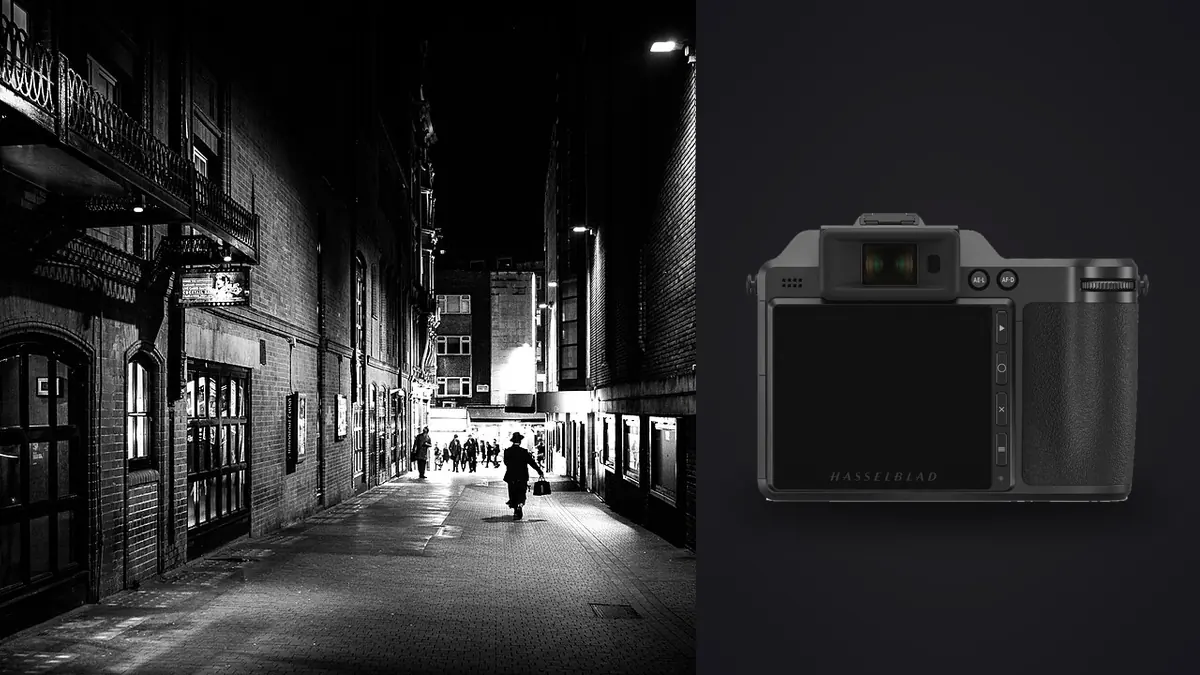
I spent a stretch of last winter carrying a Hasselblad X2D 100C through three cities on foot, mostly for documentary assignments that had nothing to do with medium format's usual home of studio portraiture or landscape work. People asked why. A 100 megapixel medium format body is not the tool anyone recommends for chasing moments on a sidewalk. It's heavy by street standards, it doesn't autofocus like a sports camera, and the files are enormous. And yet it earned its place in the bag more often than I expected, for reasons that have very little to do with resolution and a lot to do with how the camera behaves once you slow down to its pace.
This isn't a spec sheet regurgitation. It's what happened when I actually pointed this thing at strangers, market stalls, and protest crowds for weeks at a time.
Why bring a medium format body to the street at all
The obvious objection is size and speed. Fair. But documentary work isn't always decisive-moment street photography in the Henri Cartier-Bresson sense. A lot of it is closer to environmental portraiture with a documentary intent: a market vendor mid-sentence, a barber's shop reflected in a window, a demonstration seen from the edge of the crowd rather than inside the scrum. In that kind of work, the X2D's deliberateness stops being a liability and starts shaping how you shoot. You compose more carefully because the camera asks you to. You wait a half second longer for a face to turn. Some of my favorite frames from that stretch happened specifically because I didn't fire off a burst and hope, I watched and waited for one frame. The sensor also gives you something practical: cropping room. Documentary editors and photo essays often need a tighter frame than what you shot in the moment, especially when you couldn't physically get closer without changing the scene. A 100 megapixel file lets you crop a third of the frame away and still print it large or run it full bleed in a magazine spread. I've salvaged frames that would have been unusable from a 24 or 40 megapixel sensor purely because I could punch in after the fact.
Handling it on foot, honestly
At roughly 895 grams for the body alone, the X2D isn't punishing, but paired with the 38V or 55V lens and a full day of walking, you feel it by hour six. I wore mine on a Peak Design strap across the body rather than around the neck, which helped, but there's no getting around the fact that this isn't a camera you forget you're carrying the way you might with a Fuji X100 series body. The grip is genuinely good, better than I expected from a brand whose reputation was built on boxy studio cameras. One hand can support the body reliably even with the 90V attached, which matters when you're also holding a notebook, a coffee, or someone's hand while crossing a street with a camera around your neck. Shutter sound is the detail nobody mentions enough. There's no mechanical curtain slamming, since the body relies on the leaf shutters built into XCD lenses for most work, backed by a focal-plane shutter for lenses that lack one. The result is a soft, almost apologetic click rather than the confident clack of a DSLR. On the street, that's a genuine asset. People notice camera sound more than they notice camera size, and a quiet shutter buys you a few extra frames before someone clocks that they're being photographed.
The autofocus reality check
Hasselblad has improved autofocus significantly since the original X1D, and the X2D's phase-detection system is a real step up, but it is still not built for a kid running toward the camera or a cyclist weaving through traffic. Continuous tracking exists and works for moderate movement, but I missed shots on this body that a Sony A7 IV or even a Fujifilm X-T5 would have nailed without drama. If your documentary work leans toward fast-moving action, protests that turn kinetic, kids at play, this camera will frustrate you at times. If it leans toward observational, slower human moments, the AF is more than adequate.
Burst speed and the "almost duplicate" problem
At around 3.3 frames per second in continuous mode, you are not spraying and praying. That's a feature as much as a limitation, it forces discipline. But it also means that when you do fire a short burst to catch a changing expression, you end up with four or five frames that are nearly identical and need sorting later. This is where a lot of my workflow time actually went, not in editing color or exposure but in figuring out which of five near-identical 100 megapixel files was the sharpest and best expression. I started running these bursts through imagic specifically because its duplicate and burst clustering groups those near-identical frames automatically and its local sharpness scoring flags the one with the crispest eyes, which saves real time when each file is well over 100MB and your laptop groans just opening five of them side by side in a normal browser.
Lens choices that actually make sense for this kind of work
Hasselblad's XCD lineup isn't huge, but three lenses cover almost everything I needed on the street. The XCD 38V (30mm equivalent full-frame field of view) became my default. It's compact for the system, reasonably fast at f/2.5, and wide enough to work close without distorting faces the way an ultra-wide would. If I could only own one XCD lens for documentary work, this is it. The XCD 55V (roughly 43mm equivalent) sits closer to a natural-perspective normal lens and is what I reached for when I wanted an environmental portrait that felt observational rather than intrusive. It's the lens I'd hand a photographer new to the system and tell them to live with for a month. The XCD 90V (about 71mm equivalent) is a lovely lens optically but awkward on foot. It's longer, heavier, and it changes your relationship to a scene: you're now photographing from a distance rather than participating in it. I used it for maybe one frame in twenty and mostly wished I'd left it in the bag in favor of a second body or just more water. There's no true wide option under 30mm equivalent in the native lineup yet, which is a real gap if your documentary style leans toward environmental wides that swallow a whole street scene. That's the one lens I found myself wishing existed.
Battery life and the shape of a real shooting day
Hasselblad rates the X2D battery modestly, and in practice I got somewhere between 350 and 450 frames per charge depending on how much I chimped the rear screen and how cold the day was. Cold matters a lot here. On a below-freezing morning shooting a market, I watched the battery percentage drop noticeably faster than it did on a mild afternoon. I carried two spares at all times and used both on longer days. If you're used to a mirrorless body rated for 700+ shots, recalibrate your expectations and your spare battery count before you plan a multi-day documentary trip around this camera.
What the files actually cost you
This is the part nobody warns you about clearly enough before they buy in. A single 16-bit 3FR raw file from the X2D 100C runs 100 to 150MB depending on scene detail. A moderate documentary shooting day, four or five hundred frames, generates 50 to 70GB of raw data before you've touched a single edit. Multiply that across a week-long assignment and you're looking at storage numbers that used to be reserved for video shooters, not stills photographers. The practical fallout is threefold: card costs go up (I run CFexpress Type B cards almost exclusively now), backup routines take longer, and culling becomes a genuinely time-consuming task rather than a quick pass. Sorting five hundred 120MB files by eye, at full resolution, on a laptop screen, is a slow and eye-straining process. This is the single biggest workflow change the X2D forced on me compared to shooting a 24 or 45 megapixel body, and it's the reason I now run every card through imagic before I open anything in Capture One. The local sharpness and focus scoring handles the first pass (throwing out the soft or mistimed frames) entirely on my own machine, with nothing uploaded anywhere, which matters to me on assignments involving people who didn't necessarily sign up to have their faces sent through someone else's cloud server. For documentary work specifically, that offline-only processing is not a nice-to-have, it's close to a condition of doing the work responsibly.
How the files compare against the other cameras people actually debate against this one
Nobody buys an X2D 100C in a vacuum. Most people weighing it for street or documentary work are cross-shopping against a shortlist that looks something like this. Here's how they actually stack up on the things that matter for walking-around documentary work, not just spec sheet numbers.
| Camera | Sensor / resolution | Body weight | Continuous shooting | Typical raw file size | Approx. body/kit price |
|---|---|---|---|---|---|
| Hasselblad X2D 100C | 43.8×32.9mm medium format, 100MP | ~895g (body) | ~3.3 fps | 100 to 150MB | ~$8,200 (body only) |
| Leica M11 | Full-frame, 60MP | ~530g (body) | ~4.5 fps | 75 to 100MB | ~$8,995 (body only) |
| Leica Q3 | Full-frame, 60MP, fixed 28mm f/1.7 | ~743g | ~15 fps | 75 to 90MB | ~$5,995 |
| Fujifilm X100VI | APS-C, 40MP, fixed 23mm f/2 | ~521g | ~8 fps | 40 to 65MB | ~$1,599 |
What jumps out from that table isn't resolution, since three of the four cameras are within shouting distance of each other on megapixels. It's weight, speed, and price working against the Hasselblad on every axis except file quality and the tactile experience of shooting it. The X100VI wins on nearly every practical street metric and costs a fifth of the price. The Q3 gives you real speed and a genuinely excellent fixed lens. The M11 gives you rangefinder focusing discipline at a similar price point without the medium format bulk. The X2D wins on one thing only: what the sensor captures when you get it right. If that one thing matters more to your work than speed, weight, or cost, the case holds. If it doesn't, one of the other three will serve documentary work better on a day-to-day basis.
Editing a medium format documentary take without losing a week
Because the files are large and the color response out of the medium format sensor is genuinely different (flatter highlight rolloff, more tonal separation in skin, a specific rendering some Hasselblad shooters get precious about), I didn't want to hand-grade every frame from scratch. What worked was building a small set of edits I was happy with on a representative day of shooting, then using imagic's apply_my_style feature, which trains a custom AI preset on your own past edits rather than a generic one-size-fits-all look, to carry that grading across the rest of the take automatically. It's not a substitute for finishing hero images by hand, but for the bulk of a five-hundred-frame documentary set, having ninety percent of the color and tone decisions already made before you open the folder in a full editor saves hours you'd otherwise spend on repetitive grading. If you want the fuller picture of how automated culling actually decides what's sharp versus soft before you ever get to grading, this breakdown of how AI photo culling works covers the mechanics in more depth than I have room for here.
For anyone building out a faster end-to-end routine around a high-resolution body like this, it's also worth reading through these workflow tips for cutting editing time, several of which I ended up adopting specifically because the X2D's file sizes punished any inefficiency in my old process.
Who this camera is actually right for
Not every documentary photographer needs to hear this, so I'll be direct. If your work involves fast action, kids, sports-adjacent movement, or situations where you need to react in a fraction of a second, this is the wrong tool and will cost you shots that a faster, lighter camera would have caught. If your documentary style is patient, observational, and built around waiting for a scene to compose itself (market life, quiet street moments, slower-paced protest coverage, portraiture within a documentary context), the X2D 100C rewards that patience with files that hold up to large prints and heavy cropping in a way nothing else on this list quite matches. It also helps if you already have a reason to own a Hasselblad system, commercial or studio work that pays for the investment, because justifying an $8,200 body purely for street shooting is a hard sell financially even if the images are genuinely excellent.
Frequently Asked Questions
Is the Hasselblad X2D 100C too conspicuous for candid street photography?
It's larger than a rangefinder or compact camera, so people notice it more than they'd notice a Fujifilm X100VI. But the shutter is quiet and the body doesn't scream "press camera" the way a pro DSLR with a long lens does. In markets and slower street settings I found people were curious about the camera itself more often than they were suspicious of it, which sometimes opened conversations that led to better portraits.
Can you shoot handheld in low light with this camera for documentary work?
Yes, within limits. The in-body stabilization is rated up to seven stops depending on the lens, which genuinely helps at slower shutter speeds for static or slow-moving subjects. Where it struggles is any low-light scene with subject motion, since you still need a shutter speed fast enough to freeze the person, and pushing ISO on this sensor past the mid-range starts to eat into the tonal smoothness that's the whole reason to shoot medium format in the first place.
How much storage should I actually budget for a multi-day documentary shoot?
Plan for roughly 60 to 80GB per full shooting day if you're shooting at a moderate documentary pace of three to five hundred frames. A week-long assignment can easily clear 400 to 500GB once you include selects, backups, and any tethered captures. I now travel with at least two 1TB CFexpress cards and a rugged SSD for redundant backup each night.
Does the X2D 100C make sense as a second body alongside a faster mirrorless camera?
For a lot of working documentary photographers, that's actually the more honest answer than owning it as your only body. Carry something fast for the moments that need speed and pull out the X2D for the frames you know deserve the extra resolution and tonal depth, an environmental portrait, a considered wide shot, a scene you can see coming together. That two-body approach is how several photographers I know actually run it in practice.