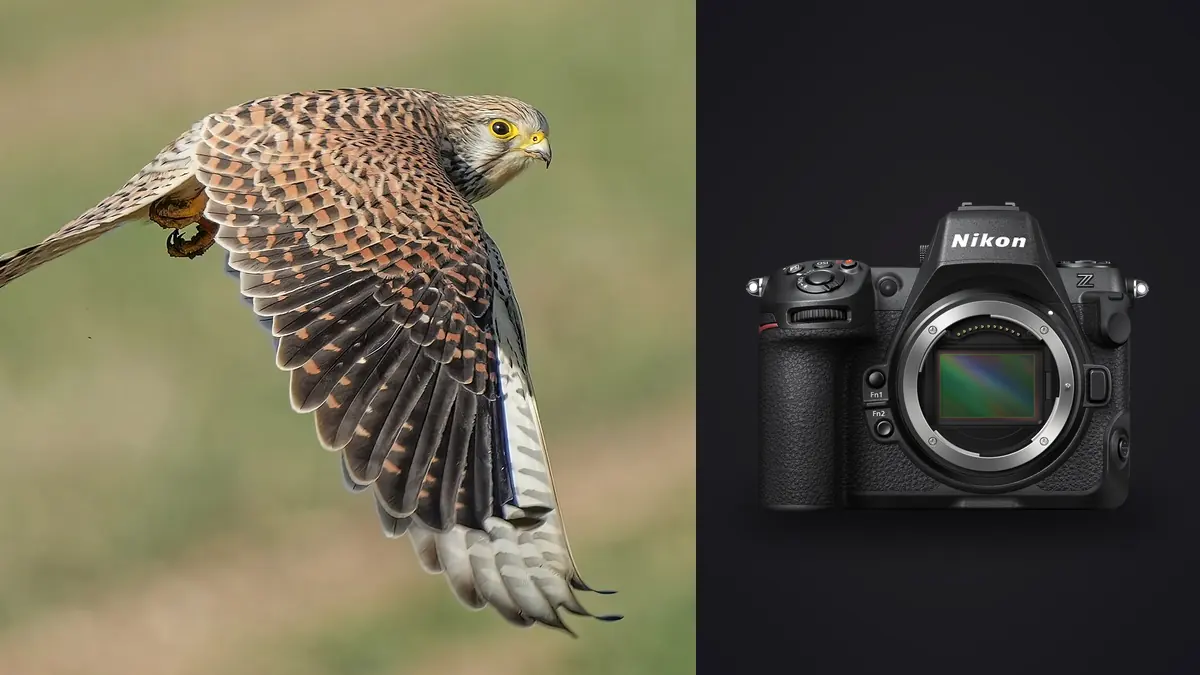
I picked up the Nikon Z8 about a year after it launched, mostly because I couldn't justify the Z9's weight for the amount of hiking my birding trips involve. What I didn't expect was how much the smaller body would change my hit rate on erratic subjects like swallows and terns, not because the autofocus is fundamentally different from the Z9's (it isn't, same stacked 45.7MP sensor, same Expeed 7), but because I could actually hold the thing steady for the three or four minutes a flock takes to work a shoreline.
This isn't a spec dump. It's what changed in my actual keeper rate once I stopped using the Z8 like a DSLR with a mirrorless badge on it, and where it still falls short.
The autofocus system, and where it actually breaks
The headline feature for birders is subject detection set specifically to "Birds" under AF-area mode, rather than the generic Animal setting. When a bird is reasonably sized in the frame and against sky, this locks on with a confidence that older Nikon bodies (D500, D850) simply couldn't match. It finds the eye, or failing that the head, and it does not let go through banking turns. Where it gets shakier: dense flocks. A skein of geese or a wheeling flock of starlings will make the camera hunt between individuals, sometimes flicking focus from your intended bird to whichever one has the cleanest edge contrast against the sky at that instant. I've had better luck in flock situations switching from Auto-area with bird detection to Wide-area AF (Large), which constrains the search zone enough that the camera stops "helpfully" jumping targets. It's a manual override, not a setting I leave on by default. Backgrounds matter more than the marketing suggests. A raptor against open sky is close to a solved problem. The same raptor dropping into a tree line, or a heron lifting off against reeds, will occasionally cause the AF to snap to background clutter for a frame or two before recovering. It recovers fast (usually within 3-4 frames at 20fps), but if that's the frame where the wings are in the position you wanted, you've lost it.
3D-tracking versus subject-detect auto-area
For predictable, sustained flight (a heron making a slow crossing, an osprey circling a fixing point over water) I actually prefer 3D-tracking with bird detection layered on top, initiated with back-button AF once the subject is acquired. It sticks to the specific bird rather than re-evaluating "which bird looks most bird-like" every frame, which matters once there's more than one bird in view. For unpredictable subjects, a kingfisher's dive or a flushed grouse, auto-area with bird detection reacquires faster because it isn't waiting on you to have placed the tracking point correctly in the first place.
Frame rate: the number that matters less than you'd think
The Z8 does 20fps in full-resolution 14-bit RAW, 30fps if you drop to JPEG or a reduced-size RAW, and 120fps at roughly 11MP using the C120 high-speed setting with pre-release capture. I used to think 120fps sounded like the obvious answer for wingbeats, and for hummingbirds it genuinely is. For anything larger, I've mostly settled back on 20fps RAW, because the file quality difference matters more than catching a wingtip position I probably wasn't going to print anyway. Pre-release capture is the feature I undersold before actually using it. Set it up and the buffer starts rolling up to a second before you fully press the shutter, so the half-press you make the moment a bird's posture changes (that little crouch before takeoff) actually gets banked. I've recovered launch sequences this way that I would have missed entirely on a Z9 without the feature, or on any DSLR. The buffer itself is deep enough that card speed, not buffer depth, is usually the limiting factor. On a fast CFexpress Type B card I can hold 20fps RAW for well over a hundred frames before any slowdown. Drop to the SD UHS-II slot as your primary and you'll hit the wall in a fraction of that, which matters if you've got the SD slot doing overflow duty and haven't checked which slot is actually primary.
| Mode | File type / size | Realistic buffer (fast CFexpress B) | Where it earns its keep |
|---|---|---|---|
| 20 fps | 14-bit RAW, full 45.7MP | 100+ frames before slowdown | Default for most BIF, best file quality |
| 30 fps | JPEG or reduced RAW | Effectively card-limited | Fast passes where you'll pick one frame and toss the rest anyway |
| 120 fps (C120) | ~11MP JPEG | 1 second rolling with pre-release | Wingbeat freeze on small, fast fliers (hummingbirds, swifts) |
| Pre-release capture | Matches selected mode | Up to 1 sec pre-roll | Launch and takeoff sequences you'd otherwise trigger a beat too late |
Lens pairings that actually make sense
The sensor and AF system are only half the equation. What you're carrying on the front of the camera decides whether you're still shooting steadily two hours into a shorebird session. I've rotated through three combinations enough to have opinions.
| Lens | Weight (approx.) | Handheld all-day? | Best for | Where it struggles |
|---|---|---|---|---|
| Z 800mm f/6.3 PF S | ~2.4 kg | Yes, with practice | Distant, wary subjects (raptors, waders on open flats) | Slow-ish f/6.3 in low light; price of entry |
| Z 180-600mm f/5.6-6.3 VR | ~1.9 kg | Yes | Budget-conscious birders, versatile zoom range | AF hunts more in dim, overcast starts to a session |
| Z 100-400mm f/4.5-5.6 VR S + 1.4x TC | ~1.4 kg (bare) | Easily | Close-range flight, in-hand agility for erratic subjects | Reach runs out fast on distant soaring birds |
The 800mm PF is the one I reach for when I know a subject will stay distant, ospreys over a reservoir, for instance. It's genuinely handholdable for a Z8 body in a way an f/5.6 800mm from the DSLR era never was, but "handholdable" for three hours straight is still a different proposition than for twenty minutes. The 100-400mm plus teleconverter is what actually lives on my camera most weekends, because most of my birding happens at ranges where 400-560mm covers it, and the extra maneuverability wins more shots on fast, close passes than raw reach does. Worth flagging: DX crop mode (1.5x) is a genuinely useful tool with this camera rather than a compromise, because you're still working with roughly 20MP after the crop and the readout speed doesn't change. I use it on the 100-400mm combo when a bird is smaller in frame than I'd like and I don't want to lose a second to a lens swap.
Settings I actually dial in before I leave the car
Shutter speed depends entirely on the wingbeat rate of what I'm chasing, and I've stopped using a single default. Small, fast-wingbeat birds (terns, small waders) get 1/3200s or faster. Larger, slower soarers like herons or buzzards are fine at 1/1600s, sometimes even 1/1000s if I want a hint of wingtip blur. I shoot in manual exposure with Auto ISO and a minimum shutter speed floor set slightly below my target, so a sudden drop into shade doesn't stall the shutter speed out from under me. Exposure compensation gets dialed in ahead of time based on background, not adjusted mid-burst. Backlit birds against bright sky need +1 to +1.7 stops or they render as silhouettes with the highlights blown on the sky itself. I check this with a test frame on a stationary gull before the interesting birds show up, not by chimping mid-sequence and missing the shot.
Grip and stamina, an underrated variable
The Z8 without the optional MB-N12 grip is genuinely lighter than a Z9, and for most of my sessions that's the point. But holding a long lens one-handed at the barrel with a grip-less body for extended tracking gets fatiguing faster than the spec sheet weight difference suggests, because your support hand is doing more of the stabilizing work relative to the camera hand. I added the grip back for anything longer than a couple of hours and don't regret the extra weight for that use case, even though it undoes some of the reason I moved off the Z9 in the first place.
What a day of shooting actually leaves you with
Here's the part the marketing never mentions: a productive two-hour session at 20fps on active birds can leave you with three or four thousand frames, most of them variations on the same three seconds of flight. That's not a complaint about the camera, it's doing exactly what a stacked sensor and deep buffer are for, but it turns the editing side of the job into its own project. I run everything through imagic before I open a single frame in an editor. The sharpness scoring is genuinely useful here in a way it isn't for, say, portrait work, because with birds in flight the difference between a tack-sharp frame and a soft one two frames later is real and often invisible at thumbnail size. Letting it flag the sharpest frame in a burst instead of eyeballing forty near-identical wing positions has probably saved me more editing hours than any lens upgrade did. The burst and duplicate clustering does the equivalent job for grouping: instead of scrolling through a wall of a hundred nearly identical takeoff frames, they get grouped so I'm choosing between clusters rather than individual images. It also matters that this runs entirely offline. A lot of my birding happens somewhere without reliable signal, riverbanks, coastal flats, and the idea of a workflow tool that wants to upload a few thousand RAW files to a cloud service before I can even see which ones are sharp doesn't fit how or where I actually shoot. Everything processes locally on the laptop in the car.
Card and file management, since it becomes a real logistics question
At 20fps in full RAW, a single CFexpress Type B card fills faster than most people expect on an active shoot day. I carry three 325GB cards now rather than relying on one large one, mostly so a card failure mid-session doesn't cost the whole day. The SD UHS-II slot I use for JPEG backup on the important sequences rather than as a capacity extension, since its write speed can't keep pace with sustained 20fps RAW anyway. One habit that's saved me grief: format cards in-camera at the start of each outing rather than deleting selectively in the field. Deleting individual frames off a CFexpress card between bursts, trying to save space mid-session, is a good way to end up second-guessing a frame you actually needed later, and it costs more attention than it saves.
Frequently Asked Questions
Is the Z8's bird detection reliable enough to trust without back-button override?
For a single bird against open sky, yes, close to entirely. Once there's a second bird in frame, or the background gets busy (tree lines, reeds, a mixed flock), I switch to a smaller AF area and drive it manually with back-button focus. Treat auto-area with bird detection as the fast default and Wide-area (L) as the tool you reach for when it starts guessing wrong.
Do I need the battery grip for a full day of birding in flight?
Not for casual sessions. For anything past two or three hours of sustained handheld tracking with a long lens, the added heft and second grip point genuinely reduce fatigue, even though it works against the Z8's main selling point over the Z9, which is being lighter to begin with.
Should I shoot at 120fps for birds in flight, or is that overkill?
It's the right tool for small, fast-wingbeat subjects like hummingbirds or swifts where you're trying to isolate a specific wing position. For anything larger, herons, raptors, gulls, the reduced file size and resolution aren't worth trading away, and 20fps RAW gives you plenty of frames to choose from anyway.
How do you avoid drowning in files after a few hours of 20fps bursts?
Cull before you edit, not during. Run bursts through something built to flag the sharpest frame per sequence and group near-duplicates before you open an editor. I use imagic for this specifically because it runs locally rather than needing an upload step, which matters when you're culling from a laptop in a car park with no signal. For more on the broader logic behind that step, how AI photo culling actually works is worth a read before you build your own workflow around it.