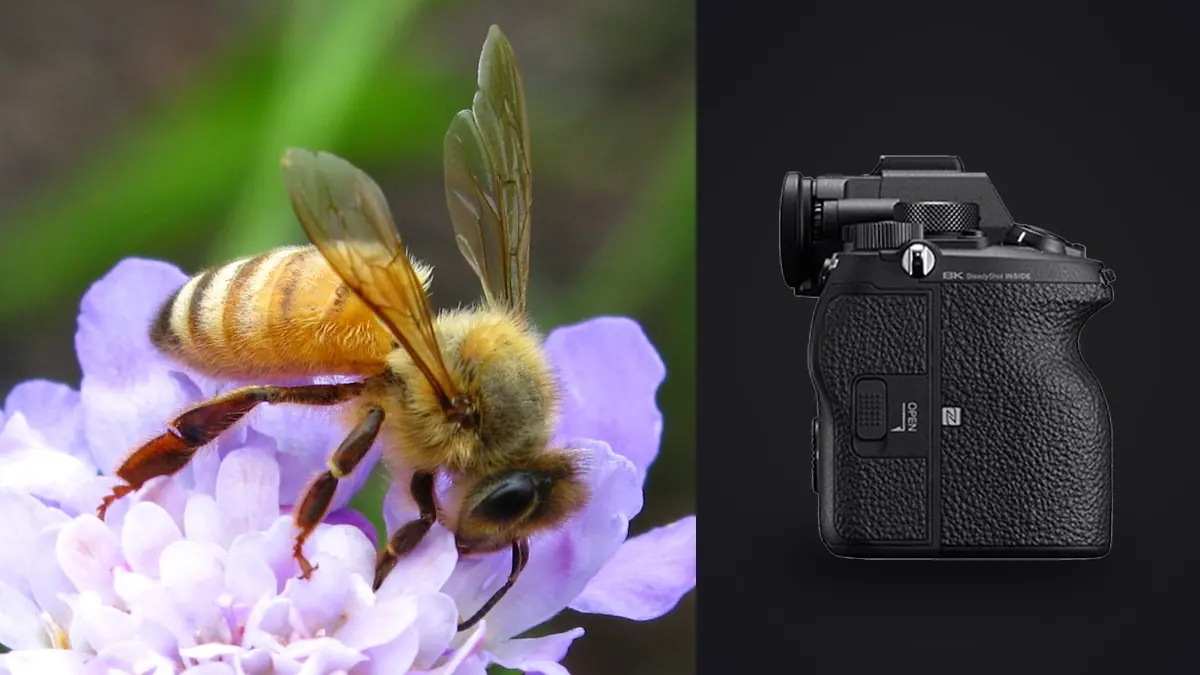
The first time I put a Sony A1 on a macro rail in a damp garden at 5:40 in the morning, my first thought wasn't about the 50-megapixel sensor. It was about how quiet the camera was. A robber fly had landed on a fence post two feet from the lens hood and didn't flinch when I fired off a burst. That detail, more than any spec sheet number, is what makes this camera worth discussing for insect work specifically, even though almost nobody at Sony designed it with dragonflies and jumping spiders in mind.
The A1 was built as a do-everything flagship: sports, birds in flight, studio fashion, 8K video. Macro insect photography is a rounding error in its marketing brief. But several of its "big camera" features solve real problems that macro shooters run into constantly, and a couple of others are genuinely wasted on this kind of work. It's worth sorting out which is which before you spend flagship money on a camera you might be using mostly at f/11 and 1/200th, six inches from a beetle.
Why sensor readout speed matters more than resolution here
Insects don't hold still, and the ones that do (a moth at rest, a beetle playing dead in your palm) are rarely the interesting shot. The A1 uses a stacked, back-illuminated sensor with a readout fast enough that electronic shutter distortion, the skewed-propeller look you get from rolling shutter on slower sensors, is close to a non-issue even at fast shutter speeds. That matters specifically for wing photography. A dragonfly hovering over a pond edge can be beating its wings 20 to 40 times a second, and a slower sensor will smear or skew the wing edges into something that reads as broken rather than fast. Silent electronic shutter is the other half of this. Jumping spiders are notorious for bolting at the click of a mechanical shutter. I've had spiders that tolerated forty or fifty silent frames from eighteen inches away and would have vanished after the second mechanical actuation. If your subject list includes anything with compound eyes wired to detect movement and sound, the silence buys you more frames per encounter, and more frames per encounter is really the whole game in insect macro.
The APS-C crop mode "extra magnification" myth
Every macro forum thread eventually claims the A1's APS-C crop mode gives you extra magnification for insect work. It doesn't, not in the way people mean. Cropping to APS-C on the A1 just reads out the central 21-megapixel portion of the sensor, the same pixels you'd get by cropping a 50-megapixel full-frame file down to that same field of view afterward. The lens's actual magnification ratio, the number that determines how large the insect physically renders on the sensor plane, doesn't change at all when you flip that switch.
What crop mode actually buys you is a slightly easier-to-compose EVF image at a tighter framing and a bit more buffer depth since you're writing smaller files. If you're chasing something tiny and want maximum resolution to crop into later, shoot full frame at 50 megapixels and crop in your editor instead. You end up with the same result, or better, and you keep the option to back off the framing if the insect suddenly walks toward the edge of the flower.
Lens pairings that actually make sense on this body
The A1 isn't married to any particular macro lens, but a handful of E-mount options come up again and again in the field, and they behave differently enough that the choice matters more than most buying guides let on.
| Lens | Magnification | Autofocus | Working distance at max magnification | Rough street price |
|---|---|---|---|---|
| Sony FE 90mm F2.8 Macro G OSS | 1:1 | Yes (DDSSM) | ~10.5 cm | ~$1,050 |
| Sony FE 50mm F2.8 Macro | 1:1 | Yes (linear motor) | ~6 cm | ~$500 |
| Sigma 105mm F2.8 DG DN Macro | 1:1 | Yes (stepping motor) | ~12.6 cm | ~$570 |
| Laowa 90mm F2.8 2x Macro APO | 2:1 | Manual only | ~8 cm | ~$550 |
| Laowa 25mm F2.8 2.5-5x Ultra Macro | 2.5:1 to 5:1 | Manual only | ~4 cm | ~$400 |
The 90mm G OSS as the default choice
For most people putting an A1 to work on insects, the FE 90mm F2.8 Macro G OSS is still the sensible starting point. Ten and a half centimeters of working distance at 1:1 is enough room to avoid casting your own shadow over a basking dragonfly, and the DDSSM autofocus motor is fast enough to acquire on approach even if you finish the last few millimeters manually, which you will, because autofocus at true 1:1 hunts on almost every camera system once depth of field drops below a couple of millimeters. OSS doesn't freeze insect motion by itself, but it steadies the frame enough that handheld focus bracketing at moderate magnification is genuinely usable, not just a marketing bullet point.
Going past 1:1 with the Laowa options
Once you want something bigger than life-size on the sensor, native AF mostly disappears from the lens options, and honestly it doesn't matter much. Depth of field at 2x and beyond is thin enough that autofocus wouldn't help even if it existed; you're rocking the camera forward and back on a focus rail and firing at the moment the eye or the leading wing edge sharpens up. The Laowa 90mm 2x is the more forgiving of the two extreme options, still leaving a usable eight centimeters of working distance. The 25mm Ultra Macro is brutal by comparison. At 4-5x you're working millimeters from the subject, which rules out most flighty insects entirely and limits you to slow-moving or restrained subjects (ants on a twig, mites, the antennae detail on a beetle) under controlled, diffused light.
Settings recipes that hold up in the field
Generic "use f/16 for macro" advice ignores how differently a perched subject, a hovering subject, and a stacked subject behave. These are the combinations I actually reach for, adjusted for whatever the light is doing that morning.
| Scenario | Aperture | Shutter speed | ISO | Focus approach | Drive mode |
|---|---|---|---|---|---|
| Perched, cooperative subject (dew-covered beetle, resting butterfly) | f/11 | 1/160 | 100-400 | Manual with focus peaking, small AF-S spot to start | Single or in-camera focus bracket |
| Insect working a flower (bee, hoverfly, mid-motion) | f/8 | 1/2000 to 1/3200 | 800-3200, Auto ISO capped | AF-C, Zone or Expand Spot, not eye-AF tracking | Hi+ (20-30fps) |
| Focus-stacked static subject at high magnification | f/5.6 to f/8 | 1/200 flash sync | 100 | Manual, rail-driven, in-camera bracket function | Focus bracket sequence |
| Dragonfly or damselfly at rest, wings visible | f/10 | 1/320 | 200-800 | Manual, peaking on the near eye | Single, few backups |
Notice the flight row uses Zone or Expand Spot tracking rather than the A1's Real-time Eye AF. Sony's subject-recognition modes are trained on humans, birds, and a handful of mammals. There's no insect-specific recognition profile, so at high magnification the camera is essentially doing generic contrast-detection tracking, which is fine for a bee's whole body against a flower but unreliable for locking onto a compound eye specifically. I've had better luck narrowing the AF area manually than trusting the tracking box to find the right six millimeters of a wasp on its own.
Focus bracketing and why a single frame usually isn't enough
Depth of field at close to 1:1 magnification and f/8 can be under a millimeter. Stop down further and diffraction starts softening the whole frame before you've gained enough sharpness to matter. The practical answer, and the reason the A1's built-in focus bracketing function gets used constantly in this genre, is to stop chasing one perfect frame and instead shoot a sequence, then blend the sharp band from each frame afterward in Helicon Focus or Zerene Stacker.
The camera's bracket function lets you set the number of frames (up to 299) and a step width from 1 to 10, and it will rack the focus and fire automatically once you start the sequence. For a mid-sized beetle at 1:1 I'm usually running 30 to 60 frames at a step width around 3 or 4. For something under a centimeter with the 25mm Ultra Macro, that number climbs past 100 without much effort. Multiply that by several subjects in a morning and you go from a couple hundred frames to well over a thousand before lunch, most of them near-duplicates of each other by design.
What happens to those frames once you're back at the laptop
This is where the appeal of the A1 as a capture tool runs straight into a sorting problem nobody warns you about before you buy one. A thousand-plus frames from a single field morning, a lot of them differing from their neighbors only in which few millimeters of the subject happen to be in focus, isn't something you want to eyeball one thumbnail at a time. I run these sessions through imagic afterward specifically because its duplicate and burst clustering groups each focus-bracket sequence together automatically, so I'm reviewing "this stack" and "that stack" as units rather than scrolling through a thousand near-identical thumbnails trying to remember which sequence belonged to which beetle. Local sharpness scoring inside the same pass does the actual heavy lifting on the flight-mode bursts, where a 30fps sequence of a hoverfly might only have three or four genuinely sharp frames buried in fifty. Since imagic processes everything on the machine rather than sending files anywhere, that culling pass works the same whether I'm doing it at a desk or on a laptop at a field site with no signal, which matters more with insect photography than most other genres since a fair amount of it happens somewhere without reliable internet.
Once the keepers are picked, the last piece I lean on is imagic's apply_my_style preset, trained on my own past edits rather than a generic preset pack. Insect macro work has a particular color problem: greens from foliage backgrounds tend to dominate and shift skin tones or chitin colors if you're not careful, and specular highlights on a wet or waxy exoskeleton blow out fast if your highlight recovery habits aren't consistent from session to session. Having a preset trained on how I've actually handled that in the past, rather than reapplying settings from scratch on every stacked image, saves real time across a folder of forty finished stacks. It's a one-time purchase rather than a subscription too, which matters when you're already carrying the cost of a flagship body and a couple of specialty lenses; more on the current pricing is on the pricing page if that's relevant to your setup. If you want the broader mechanics of how automated culling handles sharpness and duplicates in general, this rundown covers it in more detail than I can here.
A few things the A1 doesn't fix
Buffer depth and burst speed don't help if your lighting is wrong, and macro insect work is unforgiving about light. Stopping down to f/8-f/11 for depth of field eats several stops, and unless you're shooting in flat overcast conditions you'll want a diffused flash setup (a bracket-mounted speedlight with a homemade diffuser, or a twin-flash rig like the Godox MF12) more often than natural light alone. The A1's fast flash sync helps here since you're not fighting the shutter for exposure, but the camera isn't doing anything a five-year-old body with the same lens wouldn't also manage once flash is in the equation.
Battery life is the other honest caveat. A morning of focus-bracket sequences with the EVF running constantly, especially in colder dawn temperatures when dew is actually present on the subjects, will chew through an NP-FZ100 faster than the rated figures suggest. I carry two spares for anything longer than a couple of hours in the field, which is standard practice for this camera regardless of genre, but worth repeating since macro sessions run long by nature.
Frequently Asked Questions
Does the Sony A1's Real-time Tracking recognize insects specifically?
No. The subject-recognition AI covers humans, animals, and birds as distinct profiles, but there's no insect category. At close macro distances the tracking still works as generic contrast-based subject tracking, which is usable for larger, slower insects but not reliable enough to trust for something like locking onto a bee's eye mid-flight. Manual focus with peaking, or a tightly constrained AF area, tends to outperform tracking once you're inside macro working distances.
Is 30fps burst shooting actually useful for macro insect photography?
For flight subjects, yes, genuinely. A hovering hoverfly or a dragonfly catching prey happens over a fraction of a second, and having 20-30 frames of that fraction of a second dramatically increases the odds one of them lands with the wings and the eye both sharp. For perched or stacked subjects it's mostly unnecessary; you're better off shooting single frames or a deliberate focus bracket sequence than burning through buffer on a subject that isn't moving. Use a CFexpress Type A card if you plan on sustained high-fps bursts; the buffer clears noticeably slower on UHS-II SD cards.
Do I need in-body stabilization for this kind of work?
IBIS helps with handheld framing and with keeping the viewfinder steady while you're hunting for the focus plane, which matters more than people expect at high magnification where the tiniest hand tremor throws the whole frame out of alignment. It doesn't freeze subject motion, though, so it's not a substitute for flash or a fast shutter speed when the insect itself is moving. Think of it as making the process less exhausting rather than as a sharpness guarantee.
Is the Sony A1 overkill for someone just starting in macro insect photography?
Honestly, yes, for most people starting out. A Sony A7 IV or even an APS-C body paired with the same 90mm G OSS lens will get you the same magnification and very similar image quality for insect work, at a fraction of the price. The A1 earns its cost mainly in the flight-capture buffer and burst speed, and in the extra resolution if you're printing large or cropping aggressively into small subjects. If your interest is mostly perched, cooperative subjects and focus-stacked macro, a cheaper body will get you nearly identical results while you figure out whether the genre is one you want to stick with long term.