
The Nikon Z8's stacked sensor and up to 20fps RAW burst mode are genuinely useful for action and wildlife work, but they create a file management problem that a lower-burst body does not: High Efficiency NEF compression choices and burst volume both need a deliberate plan, not a default setting left untouched. Here is what actually matters for Nikon Z8 high efficiency RAW file management.
High Efficiency vs Lossless NEF: The Real Decision
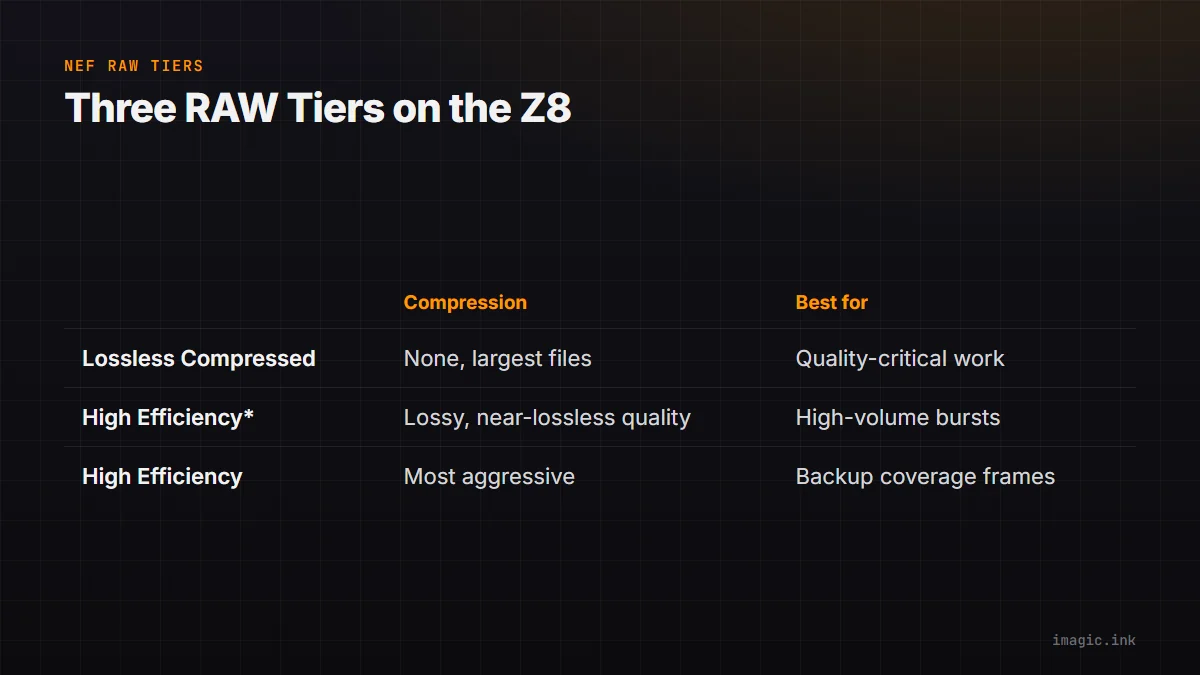
The Z8 offers three practical RAW tiers: Lossless Compressed (no data discarded, largest of the three), High Efficiency (lossy, meaningfully smaller), and High Efficiency* (lossy, closer to Lossless Compressed in quality but still smaller in size than Lossless Compressed). For most work, Lossless Compressed remains the safest default when file size is not the binding constraint. High Efficiency* is a reasonable middle ground for high-volume shooting where card space and buffer clearing matter but quality margin still counts, sports and wildlife bursts, for instance. Plain High Efficiency, the most aggressive compression, is best reserved for situations where volume genuinely outweighs quality margin, very long bursts at extended focal lengths where you know most frames are backup coverage rather than hero shots.
20fps Burst Volume: The Real Numbers
At 20fps, a 5-second burst produces 100 frames. A wildlife session with a handful of extended bursts easily produces 1,000 to 2,000 frames in an hour, and a full day of action shooting can run into the tens of thousands. At Lossless Compressed NEF (roughly 45 to 60MB per frame for the Z8's 45.7MP sensor), that volume adds up to hundreds of gigabytes per session, which is exactly the scenario where High Efficiency* earns its keep: meaningfully smaller files without giving up the quality margin that Lossless Compressed provides for the frames that matter.
Check Software Compatibility Before a Paid Shoot
This is the step most guides skip and the one that causes the worst mid-project surprises: newer compressed RAW formats, High Efficiency and High Efficiency* NEF included, are not always supported immediately or fully by every RAW processor. Before committing a paying client's shoot to High Efficiency, confirm your specific editor reads it correctly, ideally by shooting a short test burst and opening it in your actual workflow, not just checking a features list. A format that opens but demosaics or renders colors incorrectly is worse than one that simply refuses to open, because the problem may not be obvious until delivery.
A Practical Z8 Workflow
- Default to Lossless Compressed for portrait, landscape, and lower-volume work where quality margin matters more than card space
- Switch to High Efficiency* for high-burst sessions (wildlife, sports) where volume management matters but you still want real quality headroom
- Run AI quality scoring and burst grouping immediately after import; 20fps bursts create exactly the near-duplicate volume that manual review handles worst
- Confirm your editor's High Efficiency support with a real test file before the first paid shoot that relies on it
imagic reads NEF including compressed variants through its own built-in RAW engine; test compatibility with your specific camera firmware and RAW setting during the free 500-export trial before relying on it for paid work.
Where imagic Fits
imagic processes NEF locally on Windows or Mac, with AI culling and burst grouping built in at every tier to handle the volume that 20fps bursts create. See the Nikon Z8 camera page, the NEF format page, and Nikon NEF Files: Edit Without Lightroom.
Frequently asked questions
What is the difference between High Efficiency and High Efficiency* NEF?
Both are lossy compressed formats smaller than Lossless Compressed NEF. High Efficiency* targets quality closer to Lossless Compressed while still being smaller in size; plain High Efficiency compresses more aggressively for maximum space savings.
Should I always shoot Lossless Compressed on the Z8?
Not necessarily. It is the safest default for quality-critical work, but for very high-volume burst shooting, High Efficiency* often gives nearly the same usable quality at a meaningfully smaller file size.
Why does software compatibility matter more for High Efficiency RAW?
Newer compressed formats sometimes lag behind in third-party RAW processor support compared to older, more established formats, so a format that works perfectly in one editor may render incorrectly or fail to open in another.
Try imagic free for 500 exports, no card required, to test NEF compatibility before your next paid shoot. Start the free trial.