
Most photographers have a vague sense that some part of their workflow is slow, without knowing which part or by how much. A real audit takes about one job's worth of honest stopwatch time and turns that vague sense into a specific, fixable number.
Time Every Stage on One Real Job
Pick a job you are about to do anyway, not a hypothetical, and time five distinct stages separately: ingest (getting cards into your system and backed up), cull (deciding keepers from the full take), edit (global and local adjustments on the keepers), export (rendering final files), and deliver (getting files to the client, however you do that). Most photographers have never actually separated these stages in their own head, let alone with a stopwatch, and the results are frequently surprising, since the stage people assume is the bottleneck (usually editing) is often not the largest number once it is actually measured.
Benchmark Ranges to Compare Against
Once you have your own numbers, compare them against rough industry ranges to see where you sit.
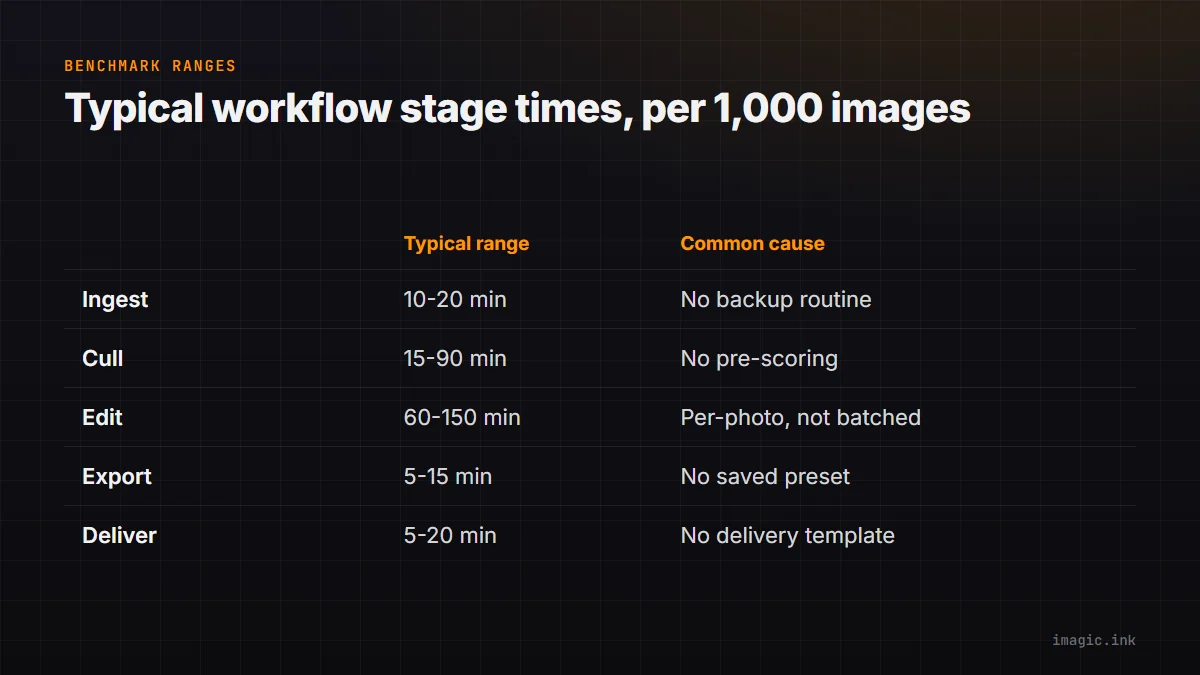
| Stage | Typical range (per 1,000 images) | Common bottleneck cause |
|---|---|---|
| Ingest | 10 to 20 minutes | No consistent backup routine, manual verification |
| Cull | 45 to 90 minutes manual, 15 to 30 with AI scoring | Reviewing every frame individually without pre-scoring |
| Edit | 60 to 150 minutes | Per-photo editing instead of batching similar frames |
| Export | 5 to 15 minutes | Manual settings per export instead of a saved preset |
| Deliver | 5 to 20 minutes | No standard gallery or delivery template |
These ranges are rough, not universal, but they give you something to measure your own numbers against instead of guessing in a vacuum.
Fix the Biggest Number First
The instinct is usually to fix whatever feels most annoying, but the audit's real value is fixing whatever is actually largest, and for most photographers reviewing thousands of frames per job, that is culling. Culling scales linearly with frame count in a way editing often does not, since editing can be batched across similar frames while manual culling requires a decision on every single one. If your own audit shows culling eating the largest share of your time, that is the stage where AI quality scoring, sharpness, exposure, closed-eye, and duplicate detection, has the most leverage, because it removes the scanning step before the decision rather than speeding up the decision itself.
What Changes After the Fix
Photographers who address a genuine culling bottleneck typically see the largest single-stage time drop of any workflow change available to them, often cutting that stage by half or more once pre-scoring removes the need to open every frame cold. It is worth re-running the same one-job audit a few weeks after making a change, since the honest before-and-after comparison is the only way to confirm the fix actually worked rather than just feeling faster. See 10 tips for a faster photo workflow and estimating AI time savings in photo editing for more on quantifying this kind of change.
Building the Audit Into a Habit
A one-time audit is useful, but the habit that compounds is doing it once per quarter or once per major shoot-type change, since workflows drift over time as gear, subjects, and volume shift. imagic's automation options are worth a look once you know exactly which stage is costing you the most time, rather than guessing at a general speedup. More audits and benchmarks like this live in the tips and workflow archive.
Frequently asked questions
How long should a workflow audit take?
It should not add meaningfully to the job itself, just track the stages you are already doing with a stopwatch or simple timestamp notes, usually adding only a few minutes of overhead total.
What if editing, not culling, turns out to be my biggest stage?
Then batching becomes the highest-leverage fix: grouping similar frames by lighting and applying one correction across the group instead of adjusting each photo individually.
Should I audit every single job, or just occasionally?
Occasionally is enough, once per quarter or whenever your typical shoot type changes meaningfully; auditing every job adds overhead without much additional insight once you know your general pattern.