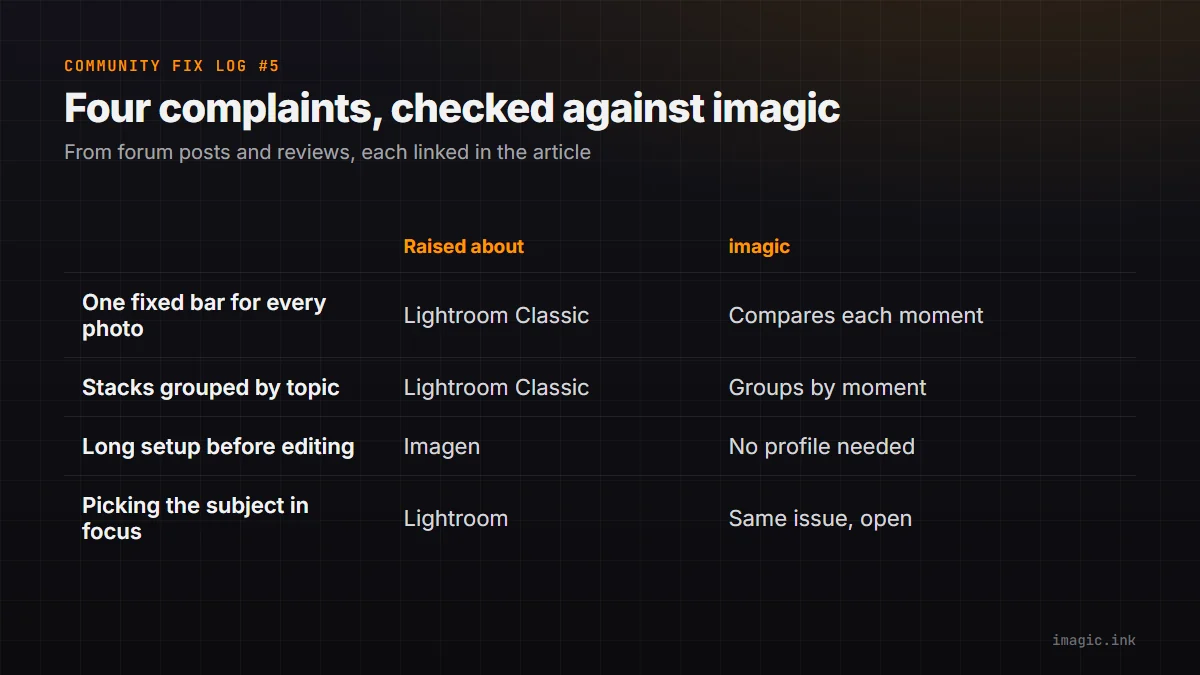
The Community Fix Log reads what photographers post about their software, picks complaints where imagic has something checkable to say, and answers each one with evidence or with an honest "we have this too". Quotes are short, word for word, linked to the original post and credited the way the person named themselves there. Every product here also has plenty of happy users; this is not a ranking. This is the fifth issue, and the earlier ones are in the Community Fix Log category, starting with issue 4. Everything about imagic below was checked against version 1.6.4 on 23 November 2026.
1. Every photo judged against one fixed bar
"I found AC not very useful because of its absolute, rather than relative nature."
Elenhil, in Adobe's Assisted Culling feedback thread for Lightroom Classic, 15 July 2026 (original thread).
What the poster describes: a single sharpness yardstick applied across a whole album, when what they want is the weak take weeded out of a group of similar frames, such as an exposure bracket. They suggest using the existing auto stacking to form those groups first.
What imagic does: culling has compared the frames covering the same moment and kept the best one since version 0.7.0, instead of judging each photo against a fixed bar. The frames that lose out are set aside for you to look at, not trashed, and each one says why. Since 1.5.19 a set of exposure brackets is recognised and kept together when its best frame is a keeper, so an HDR merge still has every frame (changelog).
Where we still fall short: choosing the best frame of a moment is still a judgement a photographer can make better, and we are still improving how the frames inside a moment are ranked. Look through the set-aside frames before you delete anything.
Status: different by design (shoot-relative culling).
2. Similar-photo stacks grouped by topic
"it stacked by topic"
Daria28088751zq3v, in the same Lightroom Classic thread, 13 July 2026 (original thread).
What the poster describes: stacking by visual similarity put all the cakes from a farm cafe shoot in one stack and all the flowers in another, even with the similarity slider at its minimum, when they expected bursts and sequences.
What imagic does: a group in imagic is a moment: frames taken one after another, close together in time, that look alike. Since version 1.3.8 each frame is compared with its group as a whole and a group stops at 24 frames, so a long sequence cannot chain different subjects together. Since 1.6.2, frames are also grouped by the gaps between capture times, so several short bursts of one moment land in one group. To keep a long day balanced, imagic can also split a shoot into chapters and keep the best few from each (changelog).
Where we still fall short: two different subjects shot seconds apart against the same backdrop can still land in one group, so give large groups a quick look.
Status: different by design (groups by moment, not by topic).
3. A long setup before the first edit
"What a rediculuos setup process this is."
Edward Amos, reviewing Imagen on Trustpilot, 15 November 2026 (original review).
What the reviewer describes: spending too long downloading the software and setting up a profile before they could edit anything, and giving up.
What imagic does: AI Auto-Enhance and AI Optimize All work on the first photo you open, with no profile to build and nothing uploaded. They balance exposure, shadows and highlights, add a look that suits the light, and put everything on the normal sliders so you can change it (changelog). If you would rather learn the app first, the tutorials page has a two-minute quick start.
Where we still fall short: without any setup, the AI edit is a general starting point, not your personal style, and a download and install are still needed because everything runs on your own computer.
Status: different by design (no profile needed to start).
4. No way to say which subject should be sharp
"needs a feature where you can pick the subject you want in focus"
russellh69018405, in Adobe's Assisted Culling feedback thread for Lightroom (desktop), 19 July 2026 (original thread).
What the poster describes: theatre photos where people in the background are meant to be soft, but the culling counts them in its focus check.
Where we have the same problem: you cannot tell imagic which subject matters either. With faces it checks the faces. Since 1.6.3 the Action profile measures focus on the subject it detects, but with the other profiles imagic still treats the area with the most fine detail as the subject, so a sharp background can pass while the real subject is soft. You can press F for focus peaking (1.6.0) or P to see the camera's AF point (1.6.3, for Sony, Nikon, Fujifilm, Panasonic and Canon EOS files when exiftool is installed), but those are checks by eye, not a fix. Choosing the subject yourself is on our backlog, with no date promised.
Status: same issue, open.
What this issue did not answer
Several posts this week were about freezes, memory use and slow analysis in other culling tools. We have no like-for-like test of those, so we are not claiming anything there. Complaints we cannot answer with evidence are left out rather than spun.
To check any claim yourself, the free trial on the desktop page is 500 exports with no card, and importing, culling and editing never count against it.
Frequently asked questions
Does imagic compare similar photos or score each one on its own?
Both. Each photo gets its own scores, and then culling compares the frames covering the same moment and keeps the best one. The others are set aside with a reason, not deleted.
How does imagic decide which photos belong in one group?
By time and appearance: frames shot one after another that look alike form a moment, and a group stops at 24 frames.
Do I need to train a profile before imagic can edit?
No. The AI edits work on the first photo you open, and every change lands on the normal sliders.
Can I tell imagic which subject should be in focus?
Not today. The Action profile finds a subject on its own, and focus peaking and the AF point show where the focus landed so you can judge it yourself.
Why quote people by their usernames?
We credit each post exactly the way the person chose to post it, and link the original so you can read it in full. We never contact reviewers on review sites, and quoting someone does not mean they use or recommend imagic.