
What "Photo Editing MCP" Actually Means
MCP, the Model Context Protocol, is an open standard that lets AI assistants call external tools directly instead of just generating text about them. A photo editing MCP server exposes an editor's real capabilities, scanning a folder, scoring image quality, applying adjustments, exporting files, as callable tools an AI agent can use. imagic is the first photo editor with an MCP server built directly into the app, part of imagic Max, rather than bolted on as a plugin or a separate scripting layer. Any MCP-compatible client, Claude Code, Claude Desktop, Cursor, or Codex CLI, can connect to it and drive a real editing session from a single prompt.
This guide covers what that actually buys you over plugins and scripts, the tool surface broken down by category, the security model, and which clients it works with today.
Why a Built-In Server Beats Plugins or Scripts
Before MCP, "AI photo editing automation" mostly meant one of two things: a scripting layer bolted onto an existing app's API, or a separate command-line tool that shells out to the editor and hopes the file format round-trips cleanly. Both have the same weakness, the automation layer and the editor's actual state drift apart. A script doesn't know what you already rated 3 stars, doesn't see your existing edit history, doesn't share your calibrated style.
A built-in MCP server avoids that because it's not a bridge to the app, it is the app's own tool surface, exposed directly:
- Shared state. The AI agent sees the same ratings, edit history, and style profile as the manual interface, because it's calling the same underlying functions.
- No format round-trip. No exporting to a temp folder, running a script, and reimporting. The agent operates on your library directly.
- Non-destructive by default. Every AI-driven adjustment lands in imagic's normal edit history, reviewable and undoable exactly like a manual edit.
- One setup step, any client. Because it's a standard protocol, not a proprietary API, the same server works with Claude Code, Claude Desktop, Cursor, or Codex CLI without separate integration work per client.
The Tool Surface, by Category
imagic's MCP server exposes a full set of tools. Rather than a flat list, they group into five workflows that mirror how a real editing session actually happens:
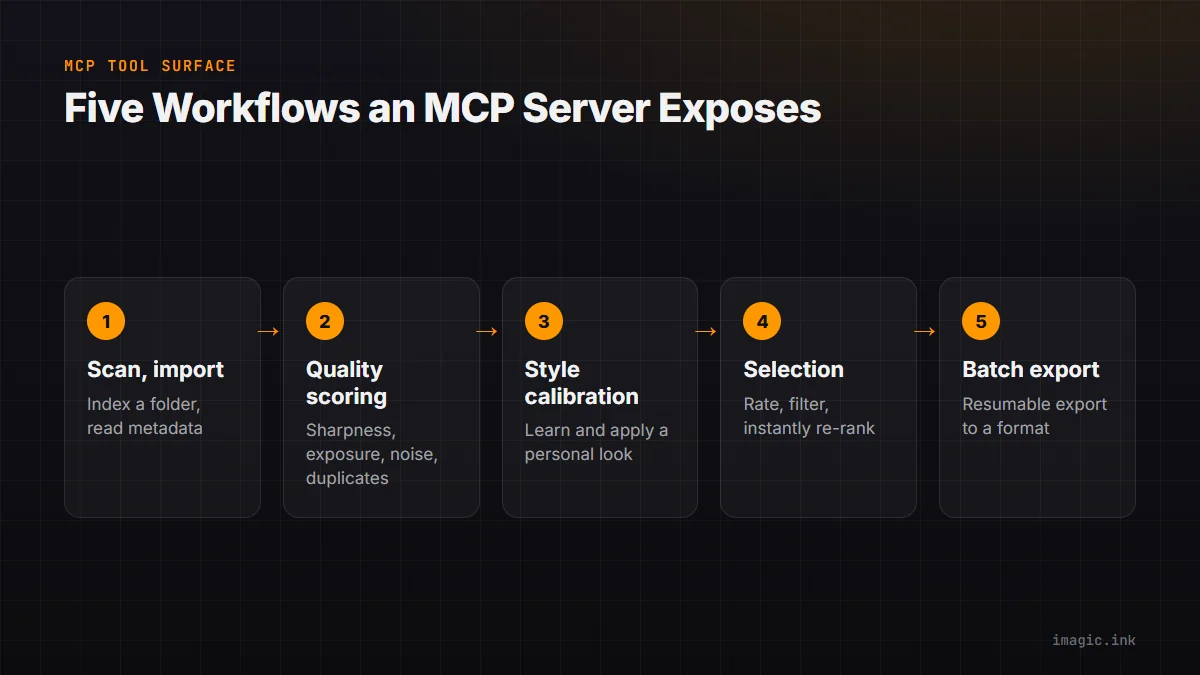
Scan and import
Indexes a folder, reads RAW metadata across the formats imagic supports, and prepares files for analysis. This is always the first call in any automated session.
Quality scoring and duplicate detection
The AI culling engine: every frame scored for sharpness, exposure, noise, and composition, plus duplicate and burst-sequence grouping so near-identical shots cluster together instead of flooding your review. This category is available on every imagic tier, not just Max, because culling is foundational to the whole product, not an add-on.
Style calibration and adjustments
The guided calibration flow that learns your editing taste from up to 8 of your own photos, plus the tools that apply that learned style, or a saved preset, across a batch in one pass.
Selection and re-culling
Rating, filtering, and ranking tools, including instant re-culling: change your "keep my best N" target or your quality threshold and the shoot re-ranks using scores already computed, no re-analysis pass required.
Batch export
Resumable export of the final selection to your chosen format and size, picking up cleanly if interrupted mid-batch.
For what this looks like as an actual conversation rather than a spec sheet, see How to Edit Photos with Claude Code or AI Agent Photo Editing: A Real Workflow, which walks an 800-photo shoot through the whole sequence.
Security and Local Processing
The MCP server runs locally, alongside imagic, on your own machine. No photos are uploaded to imagic's servers as part of MCP tool calls, the AI client talks to the server over your local machine the same way it would talk to any other local process. The one caveat: the AI client itself (Claude Code, Codex CLI, etc.) still needs its own connection to its model provider to reason about your request and decide which tools to call, that's separate from imagic and not something imagic's server controls. Your images do not pass through that connection, only your instructions and the server's text responses do.
Client Compatibility
- Claude Code:
claude mcp add imagic -- imagic-mcp, one command, works from any terminal session. - Claude Desktop: add an entry to
claude_desktop_config.json, a JSON config file, restart the app after editing. - Cursor: the same JSON shape as Claude Desktop, added to Cursor's own MCP config; most JSON-config MCP clients accept an identical entry.
- Codex CLI: add a
[mcp_servers.imagic]block to~/.codex/config.toml. Codex CLI supports local MCP servers directly, this is the concrete working path for OpenAI's ecosystem today.
ChatGPT's own connector support for MCP varies by plan and client version, so treat it as something to verify for your specific account rather than assume. See How to Edit Photos with ChatGPT and Codex for the honest breakdown of what works today versus what depends on your setup.
What It Costs
MCP and the CLI are part of imagic Max, a one-time EUR 99 license, no subscription. The free 500-photo trial (no credit card required) includes full Max access, so you can connect a client and run a real shoot through it before deciding. Lite (EUR 19) and Plus (EUR 49) include imagic's core editor and AI culling but not MCP or the CLI. Existing customers from before the tier split are grandfathered to Max.
MCP Versus the Old Way of Automating an Editor
Before an editor exposed an MCP server directly, "automating your culling" usually meant one of two paths. Either you wrote your own script against a RAW-processing library and rebuilt the quality-scoring logic yourself, or you used a plugin API that let you trigger a handful of pre-baked actions without any real reasoning layer on top. Both approaches require you to be the one holding the whole workflow together in your head, deciding what to run next, feeding output from one step into the input of the next.
An MCP server flips that. The reasoning layer, deciding what to run next based on what came back from the last call, is the AI agent's job. Your job shrinks to describing the outcome you want in a sentence. That's a bigger shift than it sounds: it means the automation adapts to a request it wasn't specifically scripted for. Ask for "my best 60, but make sure every guest table is represented" and the agent can combine the selection and re-culling tools in a way nobody wrote a dedicated script for in advance.
Common Setup Issues
The client connects but no tools show up
Almost always the Max gate. Confirm imagic is activated, either with a paid Max license or an active trial key, and not just installed.
Tool calls are slow on the first request
The first scan of a large folder builds an index; subsequent calls against the same folder are faster because that index is cached. This is expected on a first pass through a large shoot.
Style calibration tool returns fewer than 8 photos to review
Calibration draws its scenario photos from your existing library. A newer or smaller library may not cover every lighting and subject type yet, so it runs with what's available rather than blocking. Re-run it later as your library grows for a fuller profile.
FAQ
Do I need to know how to code to use a photo editing MCP server?
No. Setup is a one-time config step, then you describe what you want in plain English and the AI client handles which tools to call.
Is this the same as Lightroom's plugin API?
No. Lightroom has no AI agent access at all, plugins there extend the manual interface but don't expose tools an AI can call directly. MCP is a different layer, built for AI agents specifically, and imagic's server ships built into the app rather than as an optional install.
What happens if I don't have imagic Max?
MCP tool calls will fail or return an activation error. You'd need an active Max license or an active free trial (which includes full Max access) to use it.
Does the AI ever overwrite my original files?
No. Edits apply as non-destructive adjustments in imagic's edit history, the same as manual edits. Your source RAW files are untouched unless you explicitly export.
Get Started
Read the setup detail for your specific client, Claude Code or ChatGPT and Codex, or start with imagic's free 500-photo trial on the desktop page and MCP overview to see the full setup options in one place. No credit card required, full Max access included for 7 days.