RawTherapee has posted a real rise in search interest recently, showing up as a breakout related query alongside "free raw editor." imagic has its own direct history with this software: earlier versions bundled RawTherapee as part of the RAW pipeline, and version 1.3, released 4 September 2026, removed it in favor of a native engine built in-house. That gives a genuine, first-hand reason to explain both why the open-source option still has real fans and what a purpose-built engine actually trades off against it, without disparaging either side.
What RawTherapee actually is, verified against its own site
Per RawTherapee's own homepage, it is "a powerful, cross-platform raw photo processing system," released as free software under the GPLv3 license, running on Linux, macOS, and Windows, translated into more than 15 languages. It has been actively developed for well over a decade and has a loyal following among photographers who want full manual control over RAW development with no purchase price and no subscription. Per its GitHub releases page, the current stable version, checked in September 2026, is 5.13, released 26 July 2026, following 5.12 in May 2026, a release cadence that shows the project is still actively maintained rather than coasting on an old codebase.
What 5.13 actually changed, per its own release notes
RawTherapee's own 5.13 downloads and release-notes page documents a genuinely substantial list of changes, not a minor point release. The biggest is a default change: the working color profile switched from ProPhoto to Rec. 2020, which the release notes describe as also offering a large gamut while restricting values to colors that are physically realizable, a change the notes flag as something that can make some tools behave differently on images processed under the new default. The Gamut Compression tool gained higher maximum distance-limit values, an automatic distance-limit setting, and on-screen display of the estimated distance ratio between the working and target color spaces. The Abstract Profile tool gained adjustable highlight attenuation instead of a simple on/off toggle, plus a custom destination-primaries option adjustable by hue and saturation. Selective Editing's sharpening tools gained a new Capture Deconvolution method, bringing capture sharpening to selected regions of both RAW and non-RAW images, and the standalone Capture Sharpening tool added a presharpening denoise option aimed at noisy images. The crop tool was reworked to show multiple guides at once, support custom guide colors, display alternate aspect ratios, and define a bleed area. On the technical side, the release notes cite improved HiDPI rendering for sharper previews and thumbnails, better ARM performance from compiling with SIMDe, and broader camera, RAW format, and color-profile support.
Where "trending again" fits against RawTherapee's actual history
RawTherapee is not a new project rediscovering relevance for the first time; it has been developed continuously since long before "Lightroom alternative" was a common search phrase at all, and it has weathered multiple prior waves of renewed attention as other tools launched, changed pricing, or shipped major updates. That history matters for reading this particular spike correctly: a name with over a decade of continuous development behind it rising in search interest again is a different situation than a brand-new tool's first spike, since RawTherapee already has an established, if not massive, base of long-term users and a stable development pace to point newcomers toward, rather than an unproven, single maintainer's side project.
What the search data actually shows, and what it does not
imagic's own keyword research shows "raw therapee" rising as a related term around the seed "lightroom alternative," and appearing as a breakout related query around the seed "free raw editor." Both of those are real, measurable signals of rising search interest. Neither one, on its own, explains why. No first-party RawTherapee source publishes download or user-count figures tied to the 5.13 release, and no verifiable source ties this specific search rise to one confirmed cause, whether that is the 5.13 release itself, a wave of Lightroom-price-increase switchers, or something else entirely. The honest framing is that the interest is real and the specific driver is not confirmed; a tidier explanation would be a guess dressed up as an answer.
Why imagic used to bundle RawTherapee, and why that changed
For earlier versions of imagic, RawTherapee ran as part of the RAW processing pipeline alongside imagic's own tools, handling RAW development for the app. Version 1.3, released 4 September 2026, removed that bundled dependency in favor of a RAW engine built directly into imagic, decoding through the LibRaw library rather than shipping a second, separate application inside the installer. Consolidating RAW development into one native engine let the RAW demosaic, highlight handling, and export color-space settings run through imagic's own decode path directly, and it freed the app to build new capability straight into that pipeline rather than through an external dependency, the lens-correction feature described below being the clearest example.
What version 1.3 actually added
Alongside the move to a native engine, version 1.3 introduced a new lens corrections option, built on the open-source lensfun database, applying distortion, vignetting, and chromatic-aberration correction at decode time in both preview and export. It ships off by default and does nothing without a matching lens profile for the camera and lens combination in use, so turning it on is a deliberate, visible choice rather than a change to any existing photo's look. That gives imagic's own RAW pipeline a capability it did not have before, developed and verified in-house rather than borrowed from an external tool.
What that tradeoff actually looks like
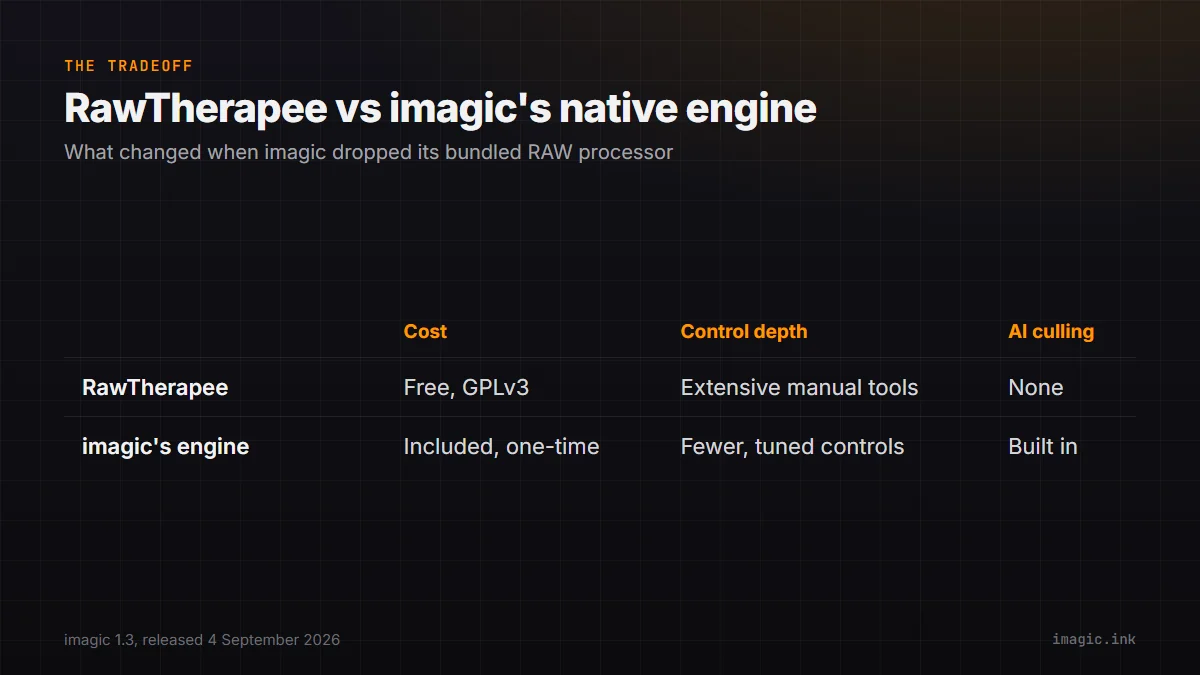
| RawTherapee (standalone) | imagic's native engine (since 1.3) | |
|---|---|---|
| Cost | Free, GPLv3 | Included in imagic's one-time price |
| Control depth | Extensive manual tool set, tone curves, wavelet editing | Fewer manual controls, tuned for speed and consistency |
| AI-assisted culling | None | Built in: quality scoring, duplicate/burst grouping |
| Platform support | Linux, macOS, Windows | Windows, macOS |
| Workflow | Standalone RAW processor | Culling and RAW editing in one application |
What a RawTherapee session actually involves
It is worth being concrete about what "manual control" means in practice, since the phrase gets used loosely. RawTherapee's interface exposes tone curves, exposure compensation, highlight and shadow recovery, wavelet-based noise reduction and local contrast, sharpening with multiple algorithm choices, color management with several rendering-intent options, and lens correction profiles, all as adjustable panels rather than a single automatic pass. That depth is precisely what a photographer who wants full authority over every decision in a RAW conversion is looking for, and it is also why RawTherapee has a steeper learning curve than a more opinionated, automated tool: every one of those panels is a decision left open rather than made for you by default. Batch processing exists too, RawTherapee can apply a saved processing profile across a folder of files from the command line or its own queue, which covers the repeatable-look use case a style or preset serves in darktable, without needing a separate application.
Why RawTherapee's real fans stay fans
None of the above is a case against RawTherapee. Its manual tool depth, wavelet-based noise reduction and sharpening, detailed tone curve control, a free price with no strings attached, is a genuinely strong combination for photographers who want full manual authority over every step of RAW development and do not mind that authority coming with a steeper interface than a more opinionated tool. A decade-plus of continuous development, including the steady 5.x release cadence documented on its own GitHub page, means camera support and bug fixes keep arriving without anyone paying for them. That depth and that price are exactly what keeps a loyal user base around software with no marketing budget behind it.
What changed in the app itself once RawTherapee left
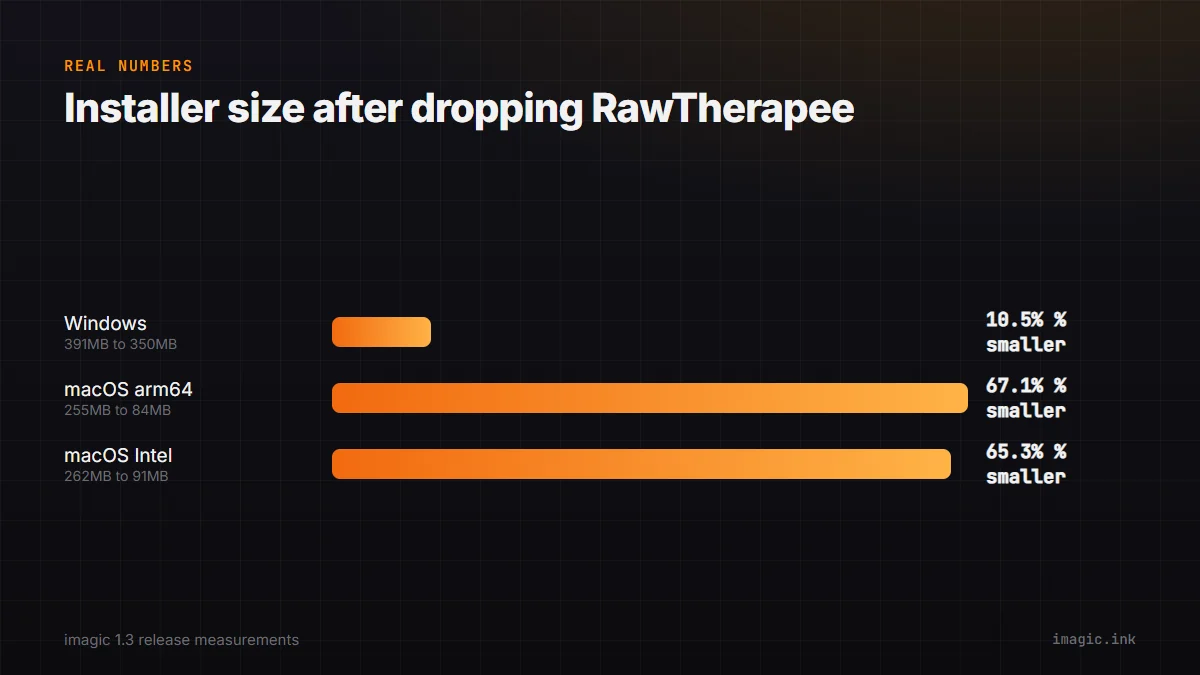
The switch to a native engine had a concrete, measurable effect on the installers themselves: shipping a single built-in RAW engine, instead of packaging a full second application inside imagic, meant installer size dropped from roughly 391 MB to 350 MB on Windows, and macOS builds saw a proportionally larger cut, arm64 falling from about 255 MB to 84 MB and the Intel build from about 262 MB to 91 MB, since a compiled copy of RawTherapee's own cross-platform application had previously made up a large share of each installer's weight. That is a straightforward mechanical consequence of removing an entire bundled application, and a genuine, checkable outcome of the change alongside the lens-correction work described above.
Why a purpose-built engine is a different tradeoff, not a strict upgrade
Replacing a general-purpose RAW processor with a native, narrower engine trades breadth of manual control for integration and consistency: fewer knobs, but a workflow where culling, RAW development, and export happen in one application with one set of AI-assisted quality scores driving what gets developed in the first place. Checking a specific camera's RAW compatibility with either tool means checking that tool's own documentation directly: RawTherapee updates its own supported-camera list on its own release cadence, independent of imagic, and the two projects no longer share any decoding code since version 1.3, so parity between them is never something to assume. That is the right tradeoff for someone whose bottleneck is getting through a shoot day's volume of files quickly. It is the wrong tradeoff for someone whose priority is wavelet-level manual control over every RAW conversion decision, which is squarely what RawTherapee is built for and imagic, honestly, is not trying to be.
How to actually evaluate RawTherapee for your own workflow
Rather than taking either side's framing on faith, a short, concrete check is more useful than a general recommendation. Download the current 5.13 release from RawTherapee's own site and run a real RAW file from your own camera through it before deciding anything. Check three things specifically: whether your camera model is listed as supported on RawTherapee's own camera-support documentation, since coverage varies by model and sensor generation; whether the new Rec. 2020 default working profile changes the starting look of your own images in a way you need to correct for, given the notes' own warning that some tools behave differently under it; and whether the tone curve, wavelet, and sharpening panels give you the specific control you were missing in whatever tool prompted the search in the first place. None of that takes more than an evening with a handful of test files, and it answers the "is this actually for me" question far better than a features list on its own can.
For a closer look at RawTherapee against darktable, the other major free RAW processor, see the existing darktable vs RawTherapee shootout, and imagic vs RawTherapee covers the AI-culling-versus-manual-control tradeoff in more detail. The Industry Insights category has more on changes like this as they happen.
Frequently asked questions
Does imagic still use RawTherapee internally?
No. Version 1.3, released 4 September 2026, removed the bundled RawTherapee dependency. RAW files now process entirely through imagic's own built-in engine.
Is RawTherapee still actively developed?
Yes. Per its own GitHub releases page, the current version is 5.13, released 26 July 2026, following a steady release cadence through 2026.
What actually caused the recent rise in RawTherapee searches?
It is not confirmed by any first-party source. The search-interest rise itself is real and measurable in imagic's own trend data, but no verifiable source ties it to one specific cause, so no single explanation is stated here as fact.