What People Mean by "Digicam Revival"
Checked 15 August 2026: the phrase covers two overlapping but distinct habits. The first is secondhand demand for 2000s and early-2010s point-and-shoot cameras, the small CCD-sensor compacts that shipped a fixed lens, a built-in flash, and JPEG-only output, and that mostly sat in drawers once phone cameras got good. The second is a newer wave of premium fixed-lens compacts that are not nostalgia purchases at all: cameras like the Ricoh GR IV, aimed at street and travel photographers who want a small body and a RAW file, not a retro filter.
Those two groups end up in the same conversation because they both fall under the same manufacturer reporting category: built-in-lens digital cameras, as opposed to interchangeable-lens bodies. The Camera and Imaging Products Association's 2026 shipment outlook puts 2025 built-in-lens camera shipments at 2,436,911 units, up 129.6 percent year on year from 1,880,414 in 2024, while interchangeable-lens shipments grew a much slower 5.9 percent over the same period. CIPA's own explanation for the jump cites demand for high-zoom and video-capable compacts rather than nostalgia buying specifically, so the number is real corroborating evidence that fixed-lens cameras are selling again, not proof of any particular purchase motive. A trade association's shipment count cannot tell you why a given buyer picked up a camera; it can only tell you that more of them left factories. CIPA also projects built-in-lens shipments to keep climbing in 2026, to roughly 2,770,000 units, according to the same release, while interchangeable-lens shipments are forecast to dip slightly.
Why the Revival Shows Up as a File Problem First
None of this matters to a culling workflow until the files land on a drive, and that is where the two digicam types stop being interchangeable. A photographer who buys a used point-and-shoot for the look gets a card full of JPEGs with no RAW fallback, whatever quirks that sensor and its in-camera processing baked in, and metadata that a modern culling tool may barely recognize. A photographer who buys a current premium compact gets a modern RAW workflow in a small body, with all the batch-editing options that implies. Treating both as "the digicam folder" is where people lose time: the sorting method that works for one does close to nothing useful for the other.
There is also a volume effect that has nothing to do with sensor generation. Small cameras get carried more, which means more sessions, more card swaps, and more chances for the same afternoon's photos to end up split across two or three cards before anyone imports them. A single beach trip with an old point-and-shoot in one pocket and a phone in the other routinely produces more raw material to sort than a planned shoot with one camera, simply because nobody thinks of a pocket camera as a big commitment before pressing the shutter.
Vintage JPEG-Only Compacts: What the Culling Problem Actually Is
Older point-and-shoots typically wrote only JPEG, with no RAW option in the firmware at all, so there is no negative to fall back on if the in-camera exposure or white balance missed. Small CCD sensors from that era also behave differently under noise and contrast than current sensors, which matters because a lot of automated culling logic leans on sharpness and exposure signals that assume a modern sensor's noise pattern. Shutter lag on cheaper models was often noticeable enough that photographers fired two or three frames to land one properly-timed shot, a habit that fills a card with near-duplicates that carry no burst-group metadata to tie them together, because the camera never recorded them as a burst in the first place.
The practical result is a folder of JPEGs where automated quality scoring has less to work with than it would on a RAW file, and where near-duplicate detection has to lean on visual similarity rather than a shared burst ID. That is not a reason to skip software entirely, but it is a reason to expect a visual pass to matter more here than it does on a modern RAW shoot.
Modern RAW Compacts: The Ricoh GR IV as a Concrete Example
The current wave of premium compacts is a different problem entirely, and the Ricoh GR IV's published specifications show why. It carries an APS-C sensor, roughly 25.74 effective megapixels, and shoots RAW in 14-bit DNG alongside JPEG, so a GR IV file lands in the same RAW format as many other current cameras rather than a proprietary one. It also ships with roughly 53GB of internal memory plus a microSD/microSDHC/microSDXC card slot rated to UHS-I, which is enough onboard storage that a day of shooting can survive a forgotten card, something no 2000s digicam offered.
Ricoh's own support FAQ for the GR IV is explicit that the camera does not ship with bundled RAW development software; it directs owners to "commercially available RAW development software for PC that supports the DNG format." That single line is the whole reason a GR IV shoot behaves like a small-body version of a full RAW workflow: whatever culls and develops the files has to be chosen separately, and DNG compatibility becomes the first filter on that choice. The same FAQ lists battery life at roughly 250 images per charge and confirms transfer support for current Windows and macOS releases over USB-C, both practical numbers for planning a full day of shooting rather than a quick outing.
A closer look at building a full workflow around this specific camera, from card handling to export settings, is covered separately in the Ricoh GR IV street and travel RAW workflow guide.
One Culling Pass Does Not Fit Both Cameras
Given how different those two files are, a workable plan treats them as two intake lanes rather than one folder.
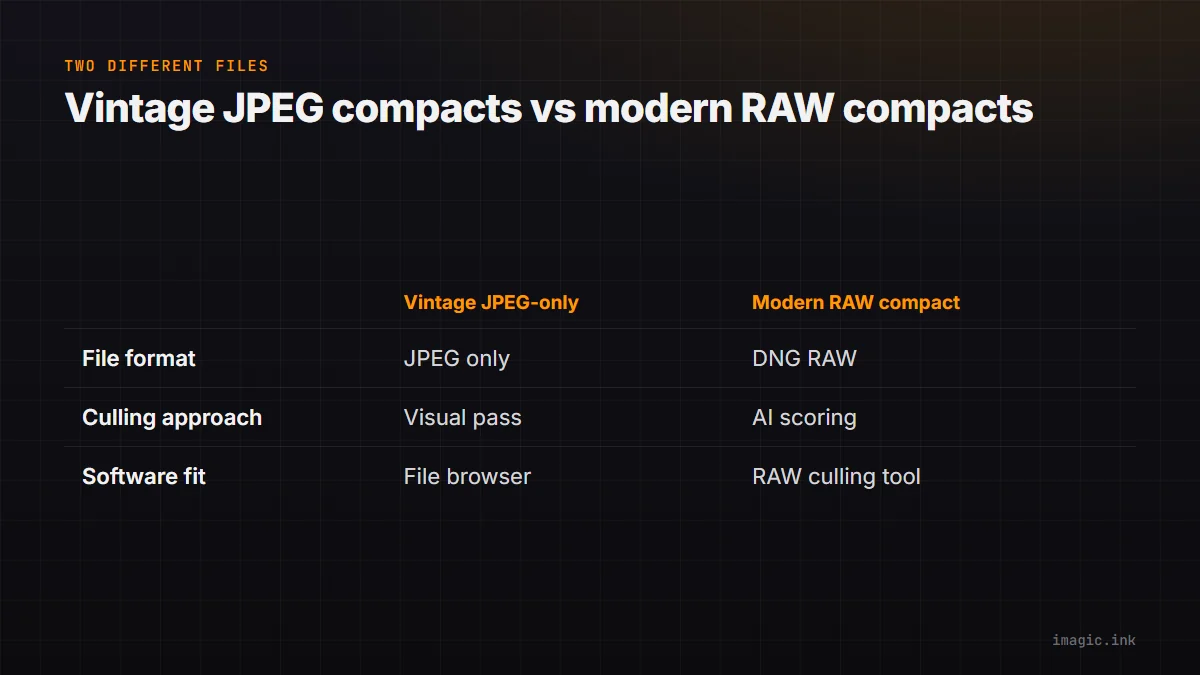
- The JPEG-only lane. Import by date and camera, then do a first visual pass by eye rather than trusting an automated sharpness score to catch everything a noisy old sensor produced. Rename files so the source camera is obvious later, since EXIF alone on some older cameras is thin. Delete duplicates cautiously; a repeated near-identical frame from shutter lag is sometimes the sharper of the pair, so a quick side-by-side beats an automatic keep-first rule.
- The RAW lane. DNG files from a camera like the GR IV work with any culling tool that reads DNG, which includes imagic among nine supported RAW formats (CR2, CR3, NEF, ARW, RAF, ORF, RW2, DNG, and PEF). imagic's culling pass scores sharpness, flags closed eyes, and checks composition, then groups near-duplicate and burst frames so a large take narrows down without a manual first look at every file; the pass runs on the machine itself, with nothing uploaded, and no command in it deletes an original. Batch editing and one-click styles then apply consistent adjustments across whatever the pass keeps, with RAW development handled by its own built-in RAW engine and export to JPEG or TIFF.
The honest caveat: a RAW-focused culling tool is not the right first stop for a box of expired-format JPEGs from an old point-and-shoot. There is no RAW data for a quality-scoring model to work against, and importing files that were never meant for a RAW pipeline mostly adds a step. A file browser, a rename convention, and a patient visual pass will get an old-digicam project further, faster. The free single-photo tool at imagic's web editor is a reasonable spot check for one or two frames from that folder before deciding whether the whole batch is worth a deeper edit.
Storage and Backup Math, With the Assumptions Shown
Two-line answers to "how much storage does a digicam habit need" are not honest, because the true number depends on file size, how many frames get shot, and how many survive culling. The numbers below use the GR IV's published storage figures as a base and state every assumption so a reader can substitute their own file size, shot count, and keeper rate.
| Assumption | Value used here | Why |
|---|---|---|
| Average DNG file size | 35MB | Working estimate for a 14-bit, roughly 26-megapixel APS-C RAW file; Ricoh does not publish an average file size, so measure your own first 50 shots and adjust. |
| Frames per full day out | 600 | A reasonable street or travel shooting pace; adjust to your own habits, since this is the single biggest lever in the math. |
| Keeper rate after culling | 15 percent | Typical for high-volume street shooting where many frames are near-duplicates of the same subject; substitute your own historical rate if you track it. |
| Backup copies kept | 2, on separate drives | A working minimum so a single drive failure does not delete the only copy; add an offsite or cloud copy for anything irreplaceable. |
At those assumptions, 600 frames at 35MB each is about 21GB for one day, which the GR IV's built-in 53GB alone could absorb for roughly two and a half days before a card or a transfer is required. A 15 percent keeper rate turns that into 90 keepers a day at 35MB, or roughly 3.2GB of files worth keeping long term, before any export copies. Two backup copies of a season's worth of keepers, say 40 shooting days at that rate, comes to about 126GB doubled to 252GB across two drives, comfortably inside a single consumer external SSD with room to spare. Change any one input, average file size, daily frame count, or keeper rate, and the total moves with it; the structure of the calculation is what carries over, not the specific gigabyte figure.
Keeping a Mixed-Camera Project From Getting Lost
A revived digicam habit rarely replaces a main camera; it sits alongside a phone and often a mirrorless or DSLR body on the same trip or project, and that is where files actually go missing. The fix is procedural rather than technical: label cards physically by camera before a shoot rather than after, import each camera's cards into its own dated subfolder before anything gets merged, and finish culling one camera's take before starting the next so a half-finished pass never gets mistaken for a completed one. A longer walkthrough of building this kind of staged import-and-cull process for a high-volume trip, including a shot list and a card-rotation plan, is covered in the guide to culling 4,000 travel photos, which applies whether the extra volume came from a digicam, a phone, or a second body.
The two-copy backup rule from that guide applies here without modification: a memory card is not a backup, and a single drive is not a backup either. Copy each day's import to two separate physical locations before formatting a card for reuse, and only then treat that day's shooting as safely captured.
Matching the Tool to the Volume, Not the Trend
Software choice should follow how much of this is actually happening, not the fact that a camera trend is in the news. Someone who picks up an old point-and-shoot for a handful of frames a month does not need a dedicated culling application at all; a folder structure and an occasional visual pass covers it. Someone shooting a RAW-capable compact several days a week, or combining digicam sessions with a heavier main-camera workflow, is closer to the volume that RAW-focused culling software is built for, whether that is imagic's local one-time-purchase model or a subscription competitor with its own account and pricing structure. A full side-by-side of the current options, including where each one is and is not a good fit, is laid out in the AI photo culling software comparison, and a Windows-specific shortlist is in the best photo culling software for Windows guide. Neither page assumes the reader owns a digicam specifically; both are useful once volume, not nostalgia, is the deciding factor.
Frequently Asked Questions
Does the CIPA shipment growth actually confirm a digicam nostalgia trend?
Not by itself. CIPA's built-in-lens camera category, which grew 29.6 percent in 2025 according to its February 2026 press release, covers every fixed-lens digital camera shipped, including high-zoom bridge cameras and current premium compacts, not only secondhand 2000s point-and-shoots. CIPA's own stated reason for the growth is demand for zoom and video-capable compacts, not nostalgia purchasing specifically. The number is genuine industry evidence that fixed-lens cameras are selling again; it is not a measurement of how many of those units were bought for a retro look. Current and past monthly data is available directly from CIPA's statistics page for anyone who wants to check the trend themselves.
Will imagic open RAW files from a Ricoh GR IV?
Yes. The GR IV records RAW as 14-bit DNG, according to Ricoh's own GR IV support page, and DNG is one of the nine RAW formats imagic reads natively, alongside CR2, CR3, NEF, ARW, RAF, ORF, RW2, and PEF. Since Ricoh does not bundle its own RAW development software with the camera, a DNG-compatible tool is a required step in any GR IV workflow, not an optional one.
Should an old JPEG-only point-and-shoot go through the same culling tool as a modern RAW compact?
Not necessarily. A RAW-focused culling pass, including imagic's, is built around signals like sharpness and exposure scoring on RAW data, plus burst-group detection from camera metadata that older JPEG-only cameras usually never recorded. A folder of plain JPEGs from a 2000s compact can still be sorted with the same software, but a straightforward visual pass and a clear rename convention often does the job faster, since there is no RAW file underneath for a quality model to evaluate.
How many photos does a revived digicam habit actually produce in a season?
There is no single answer, since it depends on how often the camera gets carried and how quickly the owner culls. The storage table earlier in this guide walks through one example, 600 frames on a full shooting day at an assumed 35MB per DNG file, but the file-size, frame-count, and keeper-rate inputs are meant to be swapped for a reader's own numbers rather than treated as a universal figure.