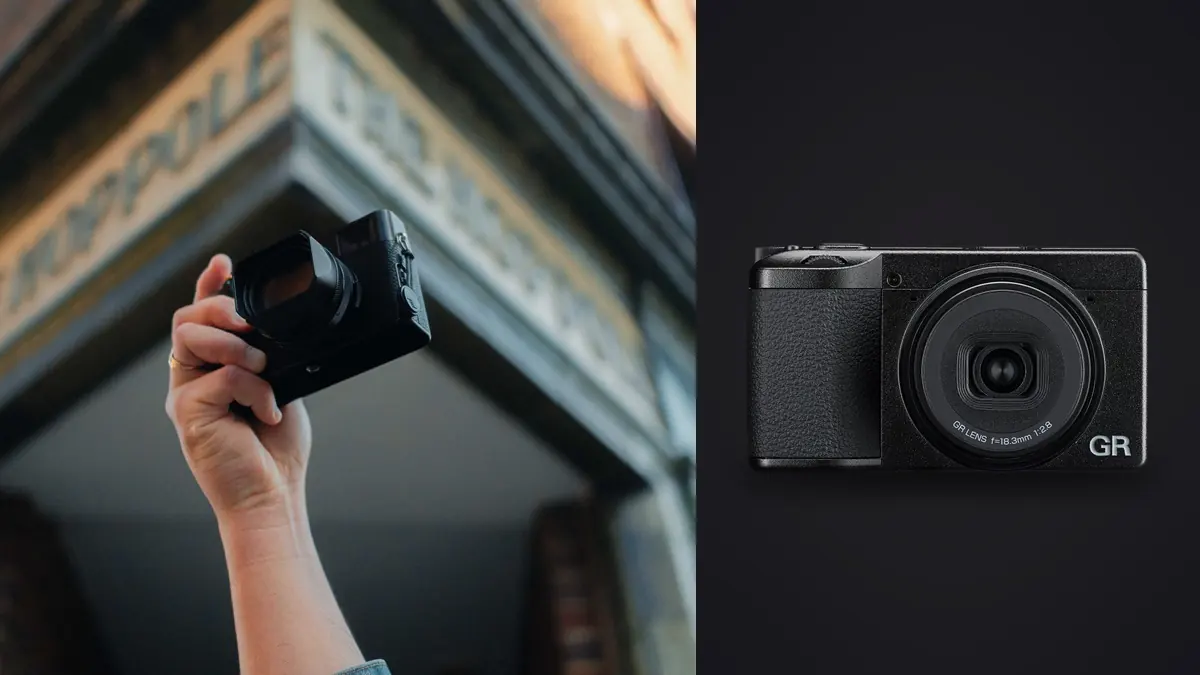
The Ricoh GR IV is a fixed-lens APS-C compact built for one kind of photography: walking a city or an unfamiliar street for a full day with one small camera in a jacket pocket, making single deliberate exposures rather than firing bursts. That shooting style produces a specific kind of workflow problem once the day ends, and it is not thousands of near-identical burst frames to sort through. It is hundreds of individually considered RAW files that still need backup, storage planning, and a culling pass before any of them reach an edit. Checked 15 August 2026: the specifications below come directly from Ricoh's own product and support pages for the GR IV, not a review unit or a retailer listing, and every calculation that follows shows its assumptions so a reader can substitute a real card, a real trip length, and a real keeper rate.
What Ricoh Actually Publishes About the GR IV
Ricoh's specification page lists a 23.3 by 15.5mm CMOS sensor at approximately 25.74 effective megapixels, paired with a fixed 18.3mm lens (roughly a 28mm full-frame equivalent) at an aperture range of f/2.8 to f/16 across seven elements in five groups, according to Ricoh's specification page. ISO runs from 100 to 204800 with automatic and manual control, and shutter speed spans 1/4000 second to 30 seconds, plus separately listed timed exposures from 10 seconds to 20 minutes, bulb, and time modes. Stabilization is a 5-axis sensor-shift system that also functions as a moire-reduction tool when the camera's optical low-pass filter is disabled in software. Body weight is approximately 262 grams with battery and card installed, 228 grams body-only, at dimensions of roughly 109.4 by 61.1 by 32.7mm, small enough to disappear into a jacket pocket.
Storage runs through a microSD, microSDHC, or microSDXC card slot rated to the UHS-I standard, backed by approximately 53GB of built-in internal memory that Ricoh's specification page states is usable on its own. Battery life is rated at approximately 250 images per charge on the DB-120 lithium-ion pack at 23 degrees Celsius, charged over USB-C; carrying a spare battery is close to mandatory for a full travel day. Video tops out at Full HD 1920x1080 at 60p, 30p, or 24p, capped at 25 minutes per clip, keeping the GR IV stills-first rather than a hybrid tool. Wireless connectivity covers dual-band Wi-Fi (2.4GHz and 5GHz, up to the 802.11ax standard) and Bluetooth 5.3 for Ricoh's GR WORLD companion app, and the physical connector is USB-C, supporting battery charging, MTP data transfer, and DisplayPort video output over the same port. Ricoh's specification page, checked 15 August 2026, does not list a weather-sealing rating for the GR IV; confirm current published materials before relying on the body in sustained rain or dust.
The DNG Advantage for a Software Workflow
One line on Ricoh's specification sheet matters more to a working file pipeline than almost anything else on the page: the GR IV records RAW as DNG, at 14-bit depth, rather than a proprietary Ricoh format. That is a small detail with a real practical consequence. A camera maker that ships a new proprietary RAW format at launch often leaves editing software with a compatibility gap for weeks, since every RAW processor has to add explicit support for that format before it can open a file. DNG avoids that gap by design; it is an openly published RAW container format that most current RAW processors already read on day one, since there is no new proprietary structure to reverse-engineer.
imagic, a local desktop culling and editing app for Windows and macOS, lists DNG among nine RAW formats it processes through its own built-in RAW engine, alongside CR2, CR3, NEF, ARW, RAF, ORF, RW2, and PEF. A GR IV owner's files land in that supported list without waiting for a format-specific update. That does not make DNG support unique to imagic; most current RAW processors handle it. It does mean RAW compatibility is a settled fact rather than a promise attached to a future update.
Storage Math: What a GR IV RAW File Actually Costs
Ricoh's specification page does not publish an exact DNG file size in megabytes, but it does not need to. The same page's storage capacity table states that 53GB of internal memory holds approximately 995 RAW images at the sensor's full 3:2, 26-megapixel setting, and a 64GB memory card holds approximately 1,117. Both figures come from Ricoh's own table, so dividing stated capacity by stated frame count gives an implied average file size straight from the manufacturer's numbers: roughly 53MB per frame from the internal-memory figure (53,000MB divided by 995 images), and roughly 57MB per frame from the card figure (64,000MB divided by 1,117 images). The two implied values differ slightly because Ricoh rounds both the stated capacity and the stated count, and because DNG file size varies with scene detail from frame to frame. A reasonable single planning figure to carry forward is 55MB per RAW file, sitting between the two.
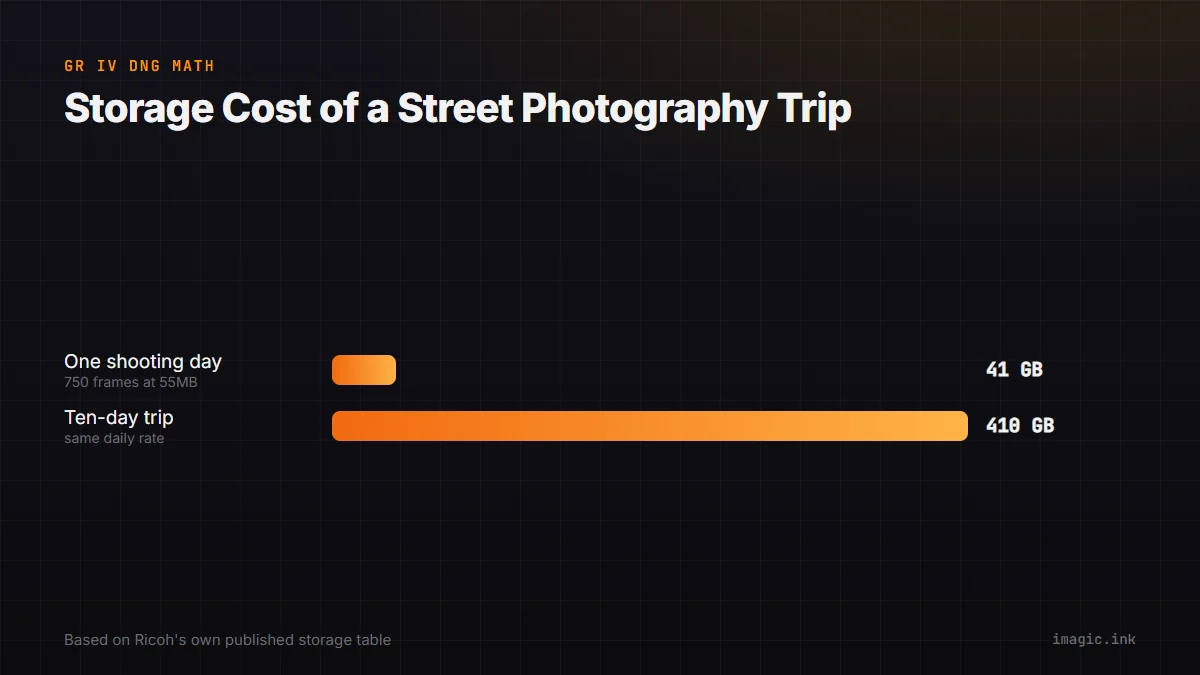
At that 55MB assumption, a single day of deliberate street shooting, say 750 exposures, a plausible middle figure for a full day of walking and shooting with a single-frame compact rather than a burst-capable body, but a number worth replacing with an honest count from past trips, works out to roughly 41GB of RAW files (750 multiplied by 55MB). Extend that across a ten-day trip at the same daily rate and the total climbs to around 410GB, before any JPEG sidecar files or video clips are added. A single 512GB microSD card technically covers that trip on paper, but a single card is also a single point of failure a long way from a backup drive. At the same 55MB assumption, the built-in 53GB holds close to a full day's shooting on its own, useful as an emergency second copy if a card fills, corrupts, or gets left behind in a hotel room.
No Published Burst Rate, and Why That Fits the Camera
Ricoh's specification page lists Continuous Shooting as one of the GR IV's drive modes but does not publish a frames-per-second figure or a buffer depth for it, at least not in the material checked for this piece. That is worth stating plainly rather than filling the gap with a number carried over from an earlier GR generation or a different Ricoh body, since an unpublished specification should be treated as unpublished, not as roughly equivalent to whatever an older model happened to do. What the absence signals about the camera's design intent is more useful than a guessed number would be: the GR IV is built around single, deliberate exposures triggered by a photographer who has already composed the shot, which is why a sports body's headline burst-rate spec simply does not apply here.
That single-frame shooting style is also why the GR IV shows up as a second, situational camera in event photography rather than a primary body. The wedding camera and file-management guide on this site covers it in exactly that role: a compact carried alongside a primary dual-card body for candid guest moments, ring and invitation detail shots, and engagement or day-after sessions where a small, unintimidating camera changes how relaxed a subject looks in front of it, while noting that its single fixed lens and lack of dual-card redundancy rule it out for coverage that cannot be retaken. That guide covers the buying and file-management picture across a full wedding day; this piece stays focused on the GR IV specifically, in the street and travel role it is actually built for.
A Travel Day's File Volume and the Culling Pass After
The storage math above answers how much space a trip needs. It does not answer how much of an evening it costs to review what a day of shooting actually produced. At 750 frames a day and even a generous keeper rate for deliberate street photography, say 15 to 25 percent, well above the 3 to 8 percent typical of a fast continuous burst since each frame here represents an individual choice rather than one of dozens fired at the same instant, a single day still produces somewhere between 110 and 190 frames worth a genuine second look, out of 750 captured. Multiply that across a ten-day trip and a photographer is looking at well over a thousand candidate frames to sort through evenings and flights.
A staged review process handles that volume without losing an evening to it: a fast first pass to remove obvious misses, such as missed focus, a blink, or a frame ruined by someone walking through the shot, before any detailed editing decisions start, followed by a slower second pass comparing the handful of near-identical frames from the same scene or subject and picking the strongest one. The guide to culling a large batch of travel photos on this site works through that staged process at a scale closer to a multi-week trip; the same staging principle applies at the smaller, single-city scale a GR IV weekend produces, with fewer total frames to move through each stage. Planning the backup and review cadence before a trip starts, rather than during it, is covered in the trip planning checklist, which lays out card rotation, two-copy backup timing, and a shot-list approach that keeps an evening's culling pass from becoming the only thing left of a traveling photographer's night.
Local Processing, the GR WORLD App, and What Actually Leaves the Camera
The GR IV's Bluetooth 5.3 and dual-band Wi-Fi connectivity exist for Ricoh's GR WORLD companion app, described on Ricoh's support page as a link for transferring images to a phone. The resolution and file types available over that wireless link, whether full-size DNG, a reduced JPEG, or both, are not detailed in the specification and support material checked for this piece, so a photographer planning to rely on phone transfer for a full-resolution RAW backup while traveling should confirm the behavior inside the GR WORLD app itself rather than assume it matches a USB-C transfer. What is clear from the specification page is the primary data path for a full RAW archive: USB-C to a computer, supporting MTP data transfer directly off the card or internal memory, independent of any wireless link or companion app account.
That distinction matters for anyone weighing a culling and editing tool against how comfortable they are with a wireless-connected workflow. A desktop RAW processor that reads files over a USB-C card reader or cable, the way imagic and most local editors do, never needs the camera's wireless radio or a phone app account at all; processing happens on the machine the files already sit on, and nothing about scoring, grouping, or exporting a photo sends it anywhere else. That is a narrower claim than a statement about whether GR WORLD itself uploads anything, which this piece has not reviewed. It is, however, the relevant question for the desktop culling step this guide focuses on. The privacy checklist covering whether culling software uploads client photos works through that broader question across several tools rather than one camera's companion app.
Culling a Day of GR IV Files Without Losing the Evening
The mechanical steps are the same regardless of which camera produced the files: ingest the day's card into the culling tool's library, run a quality pass that scores sharpness, exposure, and closed-eye detection while grouping duplicates and near-identical frames together, apply a consistent look across whatever gets kept, and export. What changes with a GR IV's shooting style, compared with a burst-heavy sports or wedding day, is how much work that automated grouping step actually has to do. Single-frame street shooting produces far fewer true near-duplicates than a continuous burst does, so most of a session's file count moves straight to individual quality scoring rather than collapsing into duplicate clusters first.
imagic runs that scoring and grouping pass locally, on Windows or macOS, at roughly 30 to 90 seconds per 1,000 photos on a modern machine, so an evening's 750-frame GR IV card takes a minute or two to process. Culling and editing both stay non-destructive: a rejected frame gets a status flag rather than deletion, batch editing and one-click styles apply a consistent look across a day's keepers, and export writes JPEG or TIFF copies without touching the original DNG. A 500-export free trial covering every tier, with no card required, is available from imagic's desktop download page for anyone who wants to run an actual GR IV card through that process before deciding whether it fits a travel routine. Photographers on the Max tier can also drive the same scan, score, and export sequence from a script rather than clicking through the desktop app, useful for a repeatable end-of-day routine on a longer trip, documented at imagic's MCP setup page; that setup runs locally too, and connecting it does not upload DNG files to a model provider or mean an AI model edits a photograph on its own.
Where the GR IV Fits, and Where It Does Not
The GR IV earns its place in a travel or street kit specifically because of what it leaves out: no lens to swap, no second card slot to manage, no burst-mode buffer to plan around, just a small, deliberately simple camera built around one focal length and single decisive exposures. That same simplicity is why it is not the right tool for a longer lens, dual-card redundancy on a paid shoot, or tracking a moving subject through a sustained burst; the wedding guide linked above covers cameras built for those jobs.
imagic is not for every workflow either, and it is worth stating plainly rather than glossing over: it has no cloud sync, no mobile app, no tethering, and no built-in printing, so a photographer who wants phone-based review or automatic sync to a second computer needs a different tool alongside it. What it is built for is the narrower step this guide has focused on: turning a card of DNG files from a camera like the GR IV into a reviewed, edited, exported set without uploading anything or waiting on a network connection to do it.
| Product | Built for | Not for you if |
|---|---|---|
| Ricoh GR IV | Pocketable, single-lens street and travel shooting with deliberate single exposures | you need dual-card redundancy, a longer lens, or a sustained continuous-fire burst |
| imagic (desktop) | Local RAW culling, quality scoring, and export on the machine the files already sit on | you need cloud sync, a mobile app, tethering, or built-in printing |
Frequently Asked Questions
Does the Ricoh GR IV shoot RAW, and in what format?
Yes. Ricoh's specification page lists 14-bit DNG as the GR IV's RAW format, alongside JPEG output in sRGB or AdobeRGB color spaces. DNG is an openly published RAW container format rather than a proprietary Ricoh extension, which tends to shorten the wait for RAW-processor compatibility compared with a brand-new proprietary format at launch.
Does imagic support the GR IV's DNG files?
Yes. imagic lists DNG among nine RAW formats it processes locally through its own built-in RAW engine, alongside CR2, CR3, NEF, ARW, RAF, ORF, RW2, and PEF, on both Windows and macOS. Files never leave the machine during scoring, grouping, or export.
How much storage does a day of GR IV street shooting need?
Working from Ricoh's own storage capacity table, an average GR IV RAW file works out to roughly 53 to 57MB, with 55MB as a reasonable single planning figure. At an assumed 750 exposures for a full day of deliberate street shooting, that comes to about 41GB per day, or roughly 410GB across a ten-day trip at the same rate. Both the frame count and the file-size assumption should be replaced with real numbers from a photographer's own shooting habits and a spot check of an actual file on a card.
Does Ricoh publish a continuous shooting speed for the GR IV?
Not in the specification page checked for this piece as of 15 August 2026. Continuous Shooting is listed as a drive mode, but no frames-per-second figure or buffer depth is given. That fits a camera built around single, deliberate exposures rather than sustained burst fire, and any specific fps figure attached to the GR IV elsewhere should be confirmed against Ricoh's own current specification page rather than assumed from an earlier GR generation.
Is the Ricoh GR IV weather-sealed?
Ricoh's specification page, checked 15 August 2026, does not list a weather-sealing rating for the GR IV. Photographers planning to shoot in sustained rain, dust, or humidity should check Ricoh's current published materials directly before relying on the body in those conditions rather than assuming a rating that is not stated.