A finished trip and an unsorted folder of several thousand frames are two very different things, and the gap between them is where most travel photography actually dies. The shots exist. The story they could tell does not, because nobody has sat down and turned four thousand raw captures into the two or three hundred that belong in an album, a print order, or a share link to family. This guide covers exactly that stretch: cards backed up, a light on-the-road triage already done, and a full archive waiting for a real decision on every frame.
For everything that happens before this point, from choosing a camera kit that matches the trip through the daily backup routine and the short evening review pass, the photography trip planning checklist covers each step in order and is worth working through before departure. What follows here assumes that groundwork is already in place and picks up at the moment the trip is over and the real cull begins.
Why four thousand frames turns into a folder nobody opens
The number itself is not the obstacle. Reviewing four thousand frames one at a time, in whatever order the camera wrote them, making a fresh judgment call on each one, is what turns a manageable task into a project that gets postponed indefinitely. Decision fatigue sets in long before the folder is half reviewed, and once a session gets abandoned partway through, restarting later means either resuming with less context than the first sitting or starting over from frame one.
A second, quieter problem compounds the first: a folder full of near-identical burst frames looks far larger than it actually is in terms of unique decisions required. A ten-second burst during a market scene or a flock of birds taking off can produce forty frames that represent one real moment, not forty separate ones. Treating each of those forty as an individual decision multiplies the workload for no benefit, since the outcome, at most, is one or two keepers from the whole burst. The method below exists to separate genuine per-frame decisions from grouped ones, so the actual number of judgment calls a reviewer has to make ends up far lower than the raw frame count suggests.
Build the folder structure before reviewing a single frame
Opening a card dump and starting to review immediately is the single most common way a large trip archive stalls out. A few minutes of folder setup first pays for itself many times over across the following passes.
- One root folder per trip, not per day. A single container folder keeps the whole archive searchable as one unit later, rather than scattered across a dozen date-stamped folders that all need opening separately during a review session.
- Subfolders by leg or location, not by card. Cards get swapped mid-day and reused across locations, so a folder structure that mirrors card numbers rather than the itinerary makes no sense once the trip is over. Subfolders named for each stop on the route, in travel order, make it possible to review one leg of the trip at a time without losing the overall thread.
- An empty selects folder, created now. Nothing goes in it during setup. Its only job is to exist before the first review pass starts, so keepers have somewhere to land without a folder-creation decision interrupting the review flow later.
- Originals stay read-only in spirit even if not in permission settings. Nothing in the folder structure should require deleting a source file to make progress. Every pass below works by marking, flagging, or copying, never by removing anything from the original set until a deliberate, separate cleanup step much later.
Importing everything as one batch, rather than day by day as the trip happened, matters more than it looks. Camera clocks that were never reset to local time zones during a multi-country trip can produce a chronological order that jumps backward and forward across days once the files are sorted by timestamp, and catching that early, while the actual order of the trip is still fresh, is much easier than untangling it weeks later purely from file metadata.
The three-pass method: reject, group, rank
The mistake that slows a large cull down the most is trying to make every kind of decision on every frame in a single pass: is it sharp, is it a duplicate of another frame, and is it actually good enough to keep, all evaluated at once. Splitting those three questions into three separate passes, each covering the full archive before moving to the next question, is consistently faster than mixing them, because each pass only requires one type of judgment rather than three simultaneously.
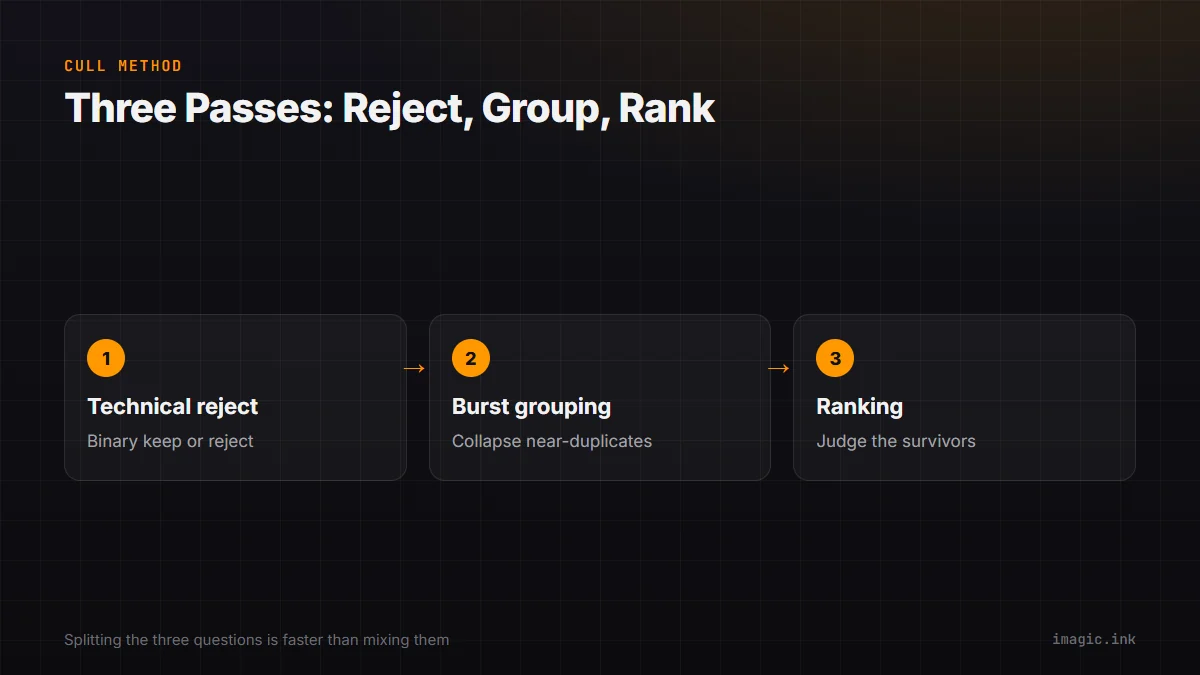
- Pass one, technical reject. A fast, binary sweep through every frame with one question only: is this technically usable at all. Out-of-focus frames, blown highlights beyond recovery, closed eyes on the only face in the shot, and accidental fires belong in the reject pile here. Nothing about composition or storytelling value enters this pass. Speed matters more than certainty; a borderline frame stays in rather than triggering a longer debate that belongs in a later pass.
- Pass two, burst and duplicate grouping. With the technical rejects out of the way, the surviving frames get grouped by moment rather than reviewed individually. A burst of a departing train, a repeated attempt at the same building facade, or several near-identical frames from a tripod sequence each collapse into one group, and the review decision becomes picking the single strongest frame from that group rather than judging every frame in it on its own merits.
- Pass three, ranking among survivors. Only the frames that passed the technical check and came out of grouping as the chosen representative reach this pass. Here the question shifts to something genuinely subjective: does this frame earn a place in the finished set, and if working toward a fixed print or album count, how does it compare to the other survivors from the same location or day. This is the pass that benefits from a full-size screen and enough time to actually look, rather than a quick thumbnail glance.
Working leg by leg through the folder structure from the previous section, rather than attempting all three passes across the entire trip in one sitting, keeps each session short enough to finish without decision fatigue setting in partway through.
Budgeting the time: a worked example with assumptions shown
How long a cull actually takes depends on frame count, how much of the archive is burst sequences versus single frames, and how quickly a given reviewer can make each type of decision, so a single fixed number is not useful. The table below shows one worked example with every assumption stated, so the numbers can be swapped for a different frame count, review speed, or burst ratio.
| Pass | Assumption used here | Time for 4,000 captured frames | Variable to substitute |
|---|---|---|---|
| Technical reject | A binary keep/reject call on a thumbnail grid, roughly 45 frames reviewed per minute | Around 90 minutes | Slower on a smaller screen or with a less familiar interface; faster with practice or with automated scoring pre-flagging likely rejects |
| Burst and duplicate grouping | Assume 60 percent of the surviving frames sit inside bursts averaging 8 frames per group, reviewed at roughly 20 groups per minute rather than per frame | Around 45 minutes for roughly 2,900 surviving frames collapsing into around 900 review units | Adjust the burst percentage and average group size for the specific mix of subjects on the trip; a slow-paced walking trip groups far less than a wildlife-heavy one |
| Ranking among survivors | A slower, full-screen comparison pass across the roughly 1,200 frames left after grouping, at around 20 frames per minute | Around 60 minutes | Slower when working toward a strict fixed count for a print or album; faster with a looser goal of simply flagging clear standouts |
| Total for the cull itself | Sum of the three passes above, split across two or three sessions rather than one sitting | Roughly 3 hours | Does not include the actual edit of the chosen keepers, which is a separate task with its own time budget |
The keeper rate at the end of this process is worth projecting in advance rather than discovering it by surprise, since it drives how much editing work follows the cull. A trip that keeps 15 percent of 4,000 captured frames finishes with 600 photos to edit; a trip that keeps 25 percent finishes with 1,000. Neither number is more correct than the other, since the right keeper rate depends heavily on the subject matter, how much of the archive was burst-heavy action versus single considered frames, and how strict the final edit is meant to be. Substituting a trip's own expected rate into that simple multiplication is more useful than assuming a fixed industry figure applies universally.
Where automated scoring helps, and where judgment still has to happen
Software that scores sharpness, flags closed eyes, and groups near-duplicate burst frames automatically can take over a meaningful share of the mechanical work in passes one and two above, since those two passes are largely rule-based rather than subjective. What that kind of software cannot do is make the ranking call in pass three, since deciding which frame from a group best tells the story of a specific moment, or which of two technically similar shots fits a print layout better, is a judgment that depends on intent rather than a measurable property of the file.
imagic's desktop app runs quality scoring and burst or near-duplicate grouping locally on the machine the photos already live on, without uploading anything, and none of its culling or editing commands delete an original file; a rejected frame stays on disk with a status that can be reversed. It supports nine RAW formats across the major camera brands, including CR2, CR3, NEF, ARW, RAF, ORF, RW2, DNG, and PEF, processed through its own built-in RAW engine, and it is priced as a one-time EUR license rather than a subscription, with tiers at 19, 49, and 99 euros and a 500-export free trial that does not require a card. According to imagic's published tool reference, the scoring and grouping step that stands in for passes one and two typically runs in the range of 30 to 90 seconds per 1,000 photos on a modern machine, which is a rough range rather than a promise for any specific hardware or archive.
It is not the right fit for every trip's post-processing needs, though. There is no mobile app and no cloud sync between a phone and a laptop mid-journey, no built-in tethering or printing, and no generative retouching or layer-based editing, so a workflow that depends on syncing edits across several devices in real time, or that needs heavy retouching beyond RAW adjustments, will want a different tool for that part of the job. For readers comparing several culling tools against each other rather than deciding on one in isolation, the AI photo culling software comparison lays out pricing, local-versus-cloud processing, and a "not for you if" limitation for each product covered, imagic included. Readers specifically weighing whether a given tool keeps images on the machine or sends them elsewhere over the network, which matters more when working through a trip's full archive than it does for a single edited photo, will find that question addressed directly in the cloud upload and privacy checklist.
Multi-stop trips: culling leg by leg instead of one giant batch
A trip covering several cities or countries produces its four thousand frames unevenly, with some legs contributing a few hundred shots and others, particularly anything wildlife-heavy or event-based, contributing far more in a single day. Waiting until the very end of the trip to start any review at all means the busiest leg's frames are competing for attention with the memory of everything that happened afterward, which makes the ranking pass in particular harder to do well.
A workable middle ground is running the technical reject pass, and only that pass, on each leg's frames during transit days between destinations, while leaving grouping and ranking for the full post-trip session described above. This stays consistent with the lighter on-the-road habit described in the trip planning checklist: a quick pass that removes obvious technical failures and nothing more, rather than a full edit that eats into time better spent seeing the destination. By the time the trip ends, the technical reject pass is already done across the whole archive, and the remaining two passes start from a smaller, cleaner set instead of four thousand unfiltered frames.
This staggered approach also limits how bad a worst case gets. A lost or corrupted card discovered mid-trip is a smaller loss when that leg's frames were already reviewed and its clear technical failures already identified, compared to discovering the same problem at the very end with nothing yet reviewed at all.
What happens to the rejects, and when it is actually safe to delete anything
Marking a frame as rejected during any of the three passes above should never be the same action as deleting it. Keeping rejected frames on disk, simply excluded from the active selects folder or flagged with a status, costs storage space but buys a second chance: a frame dismissed quickly during a technical reject pass occasionally turns out, on a slower second look, to be the sharper of two options in its burst group, and that correction is only possible if the file is still there to reconsider.
A reasonable middle ground is holding the full rejected set for a defined window, such as 30 to 60 days after the trip, rather than indefinitely and rather than immediately. That window covers the realistic period during which a print order, an album layout, or a family member's request might surface a need to revisit a specific frame, without carrying the full unedited archive forward forever. The trip planning checklist's storage math section covers how to estimate how much card and drive space a trip of a given length and subject matter is likely to need in the first place, which is the same math worth revisiting when deciding how long a local drive can comfortably hold the rejected set before it needs archiving or clearing.
Software that treats rejection as a status change rather than a deletion command removes some of the risk from this step, since an aggressive first pass through four thousand frames stops being a one-way decision. A reversible reject means the technical pass in particular can move quickly without the reviewer second-guessing every borderline call, since nothing is actually lost until a separate, deliberate cleanup happens much later, on the reviewer's own schedule rather than under pressure during the cull itself.
Frequently Asked Questions
How long does culling four thousand travel photos actually take?
The worked example above lands around three hours of active review time, split across the technical reject, grouping, and ranking passes, but that figure depends heavily on burst ratio, screen setup, and review speed. The time-budget table in this guide shows every assumption used so the estimate can be adjusted for a faster or slower reviewer, a burst-heavy trip versus a slow-paced one, or a larger or smaller total frame count.
What is a reasonable keeper rate for a big trip?
There is no fixed correct number, since keeper rate depends on subject matter, how much of the shoot was burst-heavy action, and how strict the final edit needs to be. Somewhere between roughly 10 and 30 percent of captured frames surviving to a finished set is a common range for travel work generally; multiplying a trip's own expected rate against its total frame count, as shown in the time-budget section, is more useful than assuming a single industry-wide figure applies.
Should the whole cull happen after the trip, or is some of it safe to do while still traveling?
A light technical reject pass on transit days, catching only clear focus and exposure failures, fits well into travel days without eating into time better spent at the destination. The grouping and ranking passes benefit from a full-size screen, more time, and less competition from the rest of the itinerary, so saving those two for after the trip, as covered in the multi-stop trips section above, tends to produce a better result than trying to finish the entire cull while still on the move.
Is it safe to delete rejected photos as soon as a pass is finished?
Holding rejected frames for a defined window rather than deleting them immediately protects against a fast first pass making a wrong call, since a borderline frame occasionally looks different on a second, slower look. A 30 to 60 day holding period after the trip, covered in the final section above, balances that protection against not carrying an entire unedited archive forward indefinitely.
Does grouping burst frames together risk losing the actual best shot in the group?
Only if the grouping pass is treated as a final decision rather than a first sort. The method above treats grouping as narrowing many near-identical frames down to one representative per moment, not as an irreversible cut; since rejected frames from within a group stay on disk rather than being deleted, a group's discarded frames remain available to revisit if the chosen representative turns out to have a flaw that only shows up during the ranking pass or the edit itself.