Most Lightroom users do not realize how much of their editing history lives in one place until they try to move it somewhere else. The lightroom catalog is a database, not a folder of edited photos, and understanding exactly what that means is the first step to avoiding a genuinely painful surprise down the line.
Edits Live in the Catalog, Not the Files
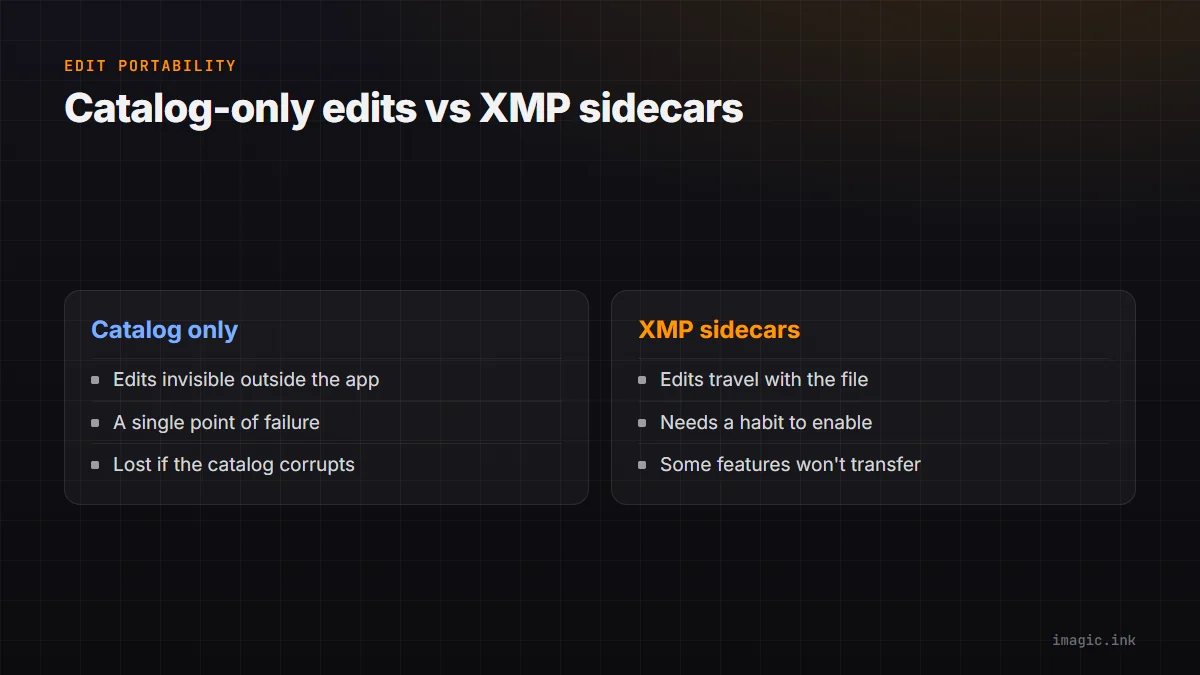
When you adjust exposure, apply a preset, or add a local mask in Lightroom, none of that is written directly into your RAW file by default. The RAW file stays untouched; the adjustments are recorded as instructions inside the Lightroom catalog, a separate database file. Open that same RAW file in a different application, or even in Lightroom without that specific catalog, and you will see the unedited original, not your finished edit. This is by design, RAW editing is non-destructive, but it means the catalog itself is the single point of failure for your entire edit history.
Why This Becomes a Problem
If the catalog file is lost, corrupted, or simply left behind during a computer switch, every edit made across potentially years of work is gone, even though the original RAW files are perfectly intact. Switching away from Lightroom entirely compounds this: without deliberately exporting edit history first, a different editor has no way to know what adjustments were ever made, because that information was never in the image file to begin with.
What XMP Sidecars Rescue
Lightroom can be set to write edit metadata into XMP sidecar files (a small companion file next to each RAW) or embed it directly into DNG files. This is the closest thing to a portable version of your edits, since the adjustment data now travels with the image file instead of staying locked inside the catalog database. Turning this on (in Lightroom's catalog settings, writing metadata to files automatically or on demand) before any migration or major backup is one of the highest-value five-minute tasks a Lightroom user can do.
What XMP Sidecars Cannot Rescue
Being honest about the limits: XMP metadata captures standard adjustments reasonably well, but complex masking, certain AI-based tools, and some Lightroom-specific features do not always translate cleanly to a different editor's interpretation of that same XMP data, and some proprietary adjustments may not transfer at all. Sidecar files are a genuine improvement over catalog-only storage, not a perfect universal translator between editing systems.
Keeping Your Archive Portable Going Forward
The practical fix is a habit, not a one-time task: write metadata to files automatically as a standing setting rather than only when planning to leave, keep RAW originals and their sidecar files together in your backup strategy rather than backing up only the catalog, and periodically export full-resolution edited copies of anything irreplaceable rather than relying on the catalog alone as the only record. A folder-based workflow, like imagic's, sidesteps the catalog lock-in problem structurally, since there is no proprietary database standing between your edits and your files; see Backing Up and Organizing Your Photo Library for a fuller backup strategy. Read imagic vs Lightroom Classic for how the two organizational models compare directly.
Frequently asked questions
Are my edits gone forever if I lose my Lightroom catalog?
If XMP sidecars or DNG-embedded metadata were being written, edits can usually be recovered by re-importing; without that, catalog-only edits are genuinely difficult or impossible to reconstruct.
Does turning on automatic XMP writing slow Lightroom down?
It can add a small amount of overhead during editing sessions since it writes to disk more often, though most users find the tradeoff worth the portability.
Is a folder-based editor immune to this problem entirely?
Largely yes, since there is no separate catalog database holding edit history hostage, though you still need normal backups of your image files and any exported edited copies.
Try imagic free for 500 exports, no card required, and see a folder-based workflow without catalog lock-in. Start the free trial.