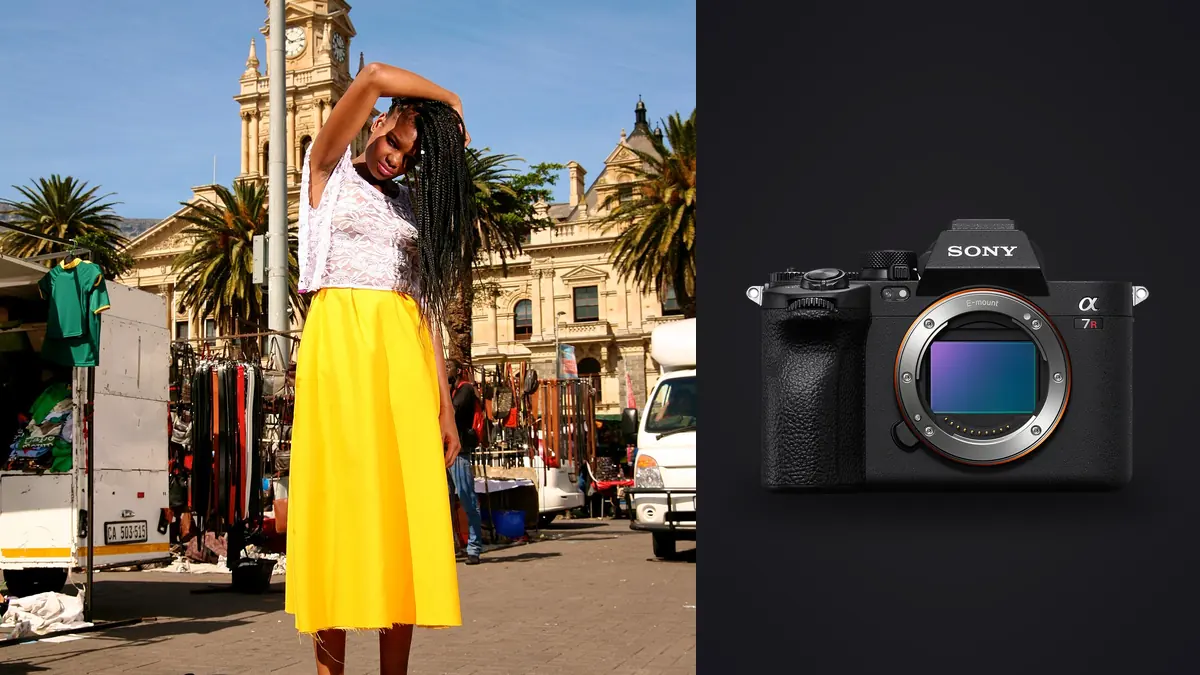
A lookbook shoot is not a portrait session with more clothes. You've got a rack of looks, a stylist counting down changes, a client standing behind the monitor wanting to see the shot before the model has even reset her weight, and a deadline that assumes the whole thing wraps by golden hour so retouching can start that night. The camera you bring has to survive that pace without becoming the bottleneck. Picture four seasonal lookbooks shot on the Sony A7R V over a year, two for a mid-size apparel brand and two for smaller independent labels. This is what actually mattered on set, not what mattered on a spec sheet.
Why 61 Megapixels Actually Earns Its Keep on a Lookbook Set
It's easy to write off 61 megapixels as marketing excess for anything short of a billboard, but lookbook delivery has a specific problem the resolution solves directly: one image, many crops. A single frame from a lookbook shoot might end up as a full-bleed spread in a PDF catalog, a square Instagram grid post, a vertical Story frame, and a cropped product-page thumbnail on the brand's e-commerce site, all from the same capture because the client didn't book separate shoots for each format. With a 9504 x 6336 pixel file, you can punch in tight on a jacket detail for the product page and still have more resolution left over than a native 24-megapixel crop would give you for the full-body catalog shot.
The other place it matters is fabric. Knitwear, tweed, sequins and anything with fine repeating texture either resolves cleanly or turns into a moiré mess depending on how much real detail the sensor captures before demosaicing kicks in. On a denim-heavy lookbook I shot last spring, the difference between the A7R V files and the 24-megapixel A7 IV files from a second shooter on the same set was visible in the weave the moment we zoomed past 100% during selects. The client's production team noticed it too, unprompted, when comparing the two photographers' galleries.
Autofocus When Wardrobe Changes Every Twenty Minutes
The AI-driven subject recognition on the A7R V is built around detecting a human as a whole (eyes, face, head, torso) rather than hunting for a face in isolation, and that distinction matters more on a fashion set than it does in a portrait studio. Models move through poses fast, turn away from camera between beats, and get partially obscured by outerwear, hats, or a stylist's hand adjusting a collar mid-sequence. The camera holds focus through those interruptions noticeably better than the older phase-detect-only tracking I used on a5-series bodies for years. I stopped babysitting the focus point around the third outfit change and just trusted it to find the model's eye or, when her face was turned, her body.
Where it's less impressive is fast movement toward camera at wide apertures, think a model walking directly at the lens at f/1.4 for an editorial-style opener shot. The AF hunts slightly more than a Sony A1 would in the same scenario, because the A1's stacked sensor reads out faster and the buffer keeps pace with a longer burst at full resolution. For a lookbook where most looks are static or semi-static poses against a seamless or location backdrop, this gap rarely shows up. It only bit me once, on a walking-shot sequence for a denim brand, and I ended up dropping to APS-C crop mode for that specific set of frames to get the faster readout.
The File Weight Problem Nobody Puts in the Brochure
Here's the part that doesn't show up in any Sony marketing copy: a day of lookbook shooting on the A7R V generates an enormous number of nearly identical frames, and each one is heavy. Uncompressed 14-bit RAW files run close to 120MB apiece. Even shooting compressed RAW, which I do for anything that isn't going into a pixel-level retouch, you're still looking at 55 to 65MB per frame. Multiply that by fifteen looks, six to ten poses per look, and a burst of four or five frames per pose to catch the right expression, and you can walk off a single-day shoot with 2,000+ frames and 120GB of RAW sitting on your cards.
That's not a storage problem so much as a triage problem. Nobody wants to pay a retoucher by the hour to page through 2,000 near-duplicate frames looking for the one where the model's chin is at the right angle and the fabric isn't bunched wrong. This is the part of the job where imagic earns its keep. It runs the sharpness and focus scoring locally on the machine, no upload, which matters on a lookbook job because collections are often unreleased and a client's contract can bar anything leaving the laptop before embargo. Dump the cards, let imagic score the burst sequences for focus accuracy and flag the sharpest frame in each cluster, and you're down from 2,000 frames to a workable shortlist before the model's even changed out of the next look.
A7R V vs. the Other Cameras Fashion Photographers Actually Argue About
Every commercial photographer I know who shoots lookbooks has had some version of this conversation at least once: A7R V, or the A1, or step up to medium format. Here's how they actually compare for this specific kind of work, based on cameras commonly owned or rented for lookbook jobs.
| Camera | Resolution | Avg. compressed RAW size | Buffer before slowdown (CFexpress A) | Realistic day rate impact |
|---|---|---|---|---|
| Sony A7R V | 61MP | ~58MB | ~180 frames (compressed RAW, 10fps) | Best crop flexibility per shoot; heaviest culling load |
| Sony A7 IV | 33MP | ~38MB | ~220+ frames | Fine for single-format delivery, thin margin for heavy crops |
| Sony A1 | 50MP | ~48MB | Effectively unlimited at 30fps (stacked sensor) | Better for movement-heavy or editorial walking shots, weaker crop headroom than A7R V |
| Fujifilm GFX100S | 102MP | ~110MB (compressed) | ~14 frames before buffer fills | Unmatched detail for static, art-directed catalog shots; unworkable for burst-heavy sets |
The GFX100S produces files I genuinely prefer for a single hero shot per look, tripod-mounted, strobe-lit, model holding still. But a lookbook usually needs six to ten usable frames per look, not one perfect frame, and the GFX buffer chokes fast once you're shooting a real sequence. The A1 is the better tool if the brief leans toward movement (a model walking a set, hair and fabric in motion) because the readout speed and buffer depth outrun anything the A7R V or GFX can do. For the bulk of lookbook work, which is controlled poses against seamless or a simple location backdrop with multiple angles per look, the A7R V's balance of resolution and buffer depth tends to be the better fit, and it costs meaningfully less than either alternative.
Shooting Handheld Between Strobe Setups
Lookbook days move fast enough that you're rarely locked to a tripod for the whole session. Between formal strobe setups you shoot handheld a lot, walking the model through a location, grabbing behind-the-scenes coverage for social, catching candid moments between poses that sometimes outperform the posed shots. The A7R V's 8-stop stabilization rating is optimistic in the way most IBIS ratings are optimistic, but in practice I can hand-hold down to around 1/15s at 35mm with a reasonable keeper rate, which matters on the overcast days when you don't want to push ISO on a 61-megapixel sensor any harder than necessary.
Noise control at higher ISO is respectable but not a strong point of this sensor relative to lower-resolution full-frame bodies. Past ISO 3200 you start losing some of the fine texture the resolution is supposed to buy you, the noise reduction (even applied later in post) softens fabric detail before it fully cleans up the shadows. On indoor lookbook sets with continuous LED panels rather than strobes, keep ISO under 2000 wherever the schedule allows and lean on the wider apertures instead, since context (studio, not action) usually allows for it.
Skin Tones and Color Across a Full Day of Looks
Fashion clients care about skin tone consistency more than clients in almost any other genre, because a lookbook gets viewed as a set. If frame 40 and frame 400 don't match in color temperature and skin rendering, it reads as sloppy even if each individual image looks fine on its own. The A7R V's color science under mixed lighting (strobe plus ambient window light, which happens constantly on location lookbook days) holds up well straight out of camera, but "well" still means every session needs a consistent grading pass before delivery.
This is where imagic's apply_my_style feature has actually changed how I handle multi-look days. I trained it on a set of my own graded lookbook edits from a previous job for the same brand, and it applies that same tonal signature across a new batch without me manually matching white balance and skin tone look-by-look. It's not a substitute for a proper grade on the hero images, but for the volume of secondary and detail shots in a lookbook delivery, it gets me to a consistent starting point across looks shot hours apart under different light, which used to be the slowest part of my post-production day.
Getting From Memory Card to Client Delivery
A realistic lookbook delivery workflow on this camera looks like this. Cards come off the body still holding both a CFexpress Type A card and a UHS-II SD as backup, since the A7R V's dual slots let you mirror the same files for redundancy, which any paid commercial job should be doing regardless of camera. Files import at native 61MP, and the first pass is pure triage: cutting anything with a closed eye, motion blur on the fabric, or a stray hand in frame. I do this culling pass in imagic because the duplicate and burst clustering groups the four or five near-identical frames from each pose together automatically, so I'm comparing five frames of the same beat side by side instead of scrolling a flat grid of 2,000 thumbnails trying to remember which ones belonged together.
From there it's grading (apply_my_style gets the batch to a consistent baseline, then hand-adjust the ten to fifteen hero frames that matter most), export at whatever resolution the specific deliverable needs, and a same-day or next-day gallery for approval. If this part of your process still feels like the slow stretch of every shoot, it's worth reading through how AI photo culling actually works to understand what's happening under the hood before you trust it with important files. And if color consistency across a full lookbook set is the piece giving you trouble, the breakdown in this color grading guide covers the fundamentals that any preset or style-matching tool is built on top of.
Frequently Asked Questions
Do I really need 61 megapixels for a lookbook, or is that overkill for most brands?
It depends on how many deliverable formats the client expects from one shoot. If you're only ever delivering one crop ratio for one use case (say, straight product shots at a fixed size), 24 to 33 megapixels is plenty and you'll save yourself storage and culling time. Lookbooks almost always get repurposed into catalog spreads, social crops, and web thumbnails from the same source images, and that's the scenario where the extra resolution stops being vanity and starts being useful headroom.
How many outfits can I realistically shoot in a full day with this camera?
On a well-run set with a stylist keeping changes tight, fifteen to eighteen looks in a ten-hour day is realistic, roughly six to eight poses each with a short burst per pose. The camera isn't the limiting factor at that pace, wardrobe changes and lighting adjustments between looks eat more time than the camera does. Where the camera does become the bottleneck is buffer clearing if you shoot long bursts at full 14-bit uncompressed RAW; switching to compressed RAW gets you meaningfully more shots before the buffer backs up.
Should I shoot compressed or uncompressed RAW for a lookbook job?
Compressed RAW, for almost everything. The visual difference between compressed and uncompressed on the A7R V is negligible for lookbook-style retouching (skin, fabric, color grading), and compressed files are roughly half the size, which matters twice over: once for buffer depth during a burst, and again when you're culling and storing 2,000+ frames from a single shoot day. I reserve uncompressed for the one or two hero campaign frames per look that I know are getting heavy retouching and large-format print.
Is the autofocus fast enough for a model walking toward camera, or should I rent something else?
For static and semi-static posing, which covers most lookbook work, the tracking is reliable and you won't think about it much once a session gets going. For a walking shot straight at the lens at a wide aperture, you may get better hit rates dropping into APS-C crop mode for the faster readout, or borrowing an A1 for that specific segment of the shoot if the brief calls for a lot of movement. If your lookbook brief is mostly editorial motion rather than posed catalog shots, it's worth budgeting for that rental rather than assuming the A7R V will cover it as well as a stacked-sensor body would.
Where the A7R V Fits in a Lookbook Kit
The Sony A7R V isn't the fastest camera you could bring to a fashion set, and it isn't the highest-resolution one either. What it gets right for lookbook work specifically is the combination: enough resolution to cover multiple deliverable formats from a single shoot, autofocus that holds up through the interruptions a real set throws at it, and a buffer that survives a full burst-heavy day without becoming the thing you're fighting instead of the clothes. The camera gets you through the shoot. What happens to the 2,000 files afterward, on a deadline, for a client who needs a gallery by tomorrow, is its own problem, and that's really where the difference between a good shoot day and a good delivery day gets decided.