Why Same-Day Delivery Is Harder Than It Sounds
Same-day delivery used to be reserved for photojournalists on deadline and sports photographers with a dedicated editor sitting beside them. Now it is a routine expectation at conferences, product launches, galas, and even weddings with a same-day highlight reel. The client wants a gallery link before the event has fully wound down, or first thing the next morning at the latest. This guide covers the workflow changes that make that realistic, drawing on the same fast-turnaround principles covered across imagic's tips and workflow coverage.
The difficulty is not really about editing speed. It is about volume and variance arriving at the same time. A single-day conference can produce several thousand frames across keynote stages, breakout sessions, networking shots, and candid moments, all under wildly different lighting: harsh stage spotlights, dim ballroom ambient light, and daylight from lobby windows within the same hour. Sorting through that volume by hand, correcting exposure and white balance shot by shot, and exporting a client-ready gallery in the same day is a genuine logistics problem, not just a matter of working faster. The techniques event photographers use to hit same-day turnaround overlap heavily with what has already worked for wedding photographers delivering faster, since both are really a volume-and-consistency problem, not a talent problem.
Building a Same-Day-Capable Workflow
Same-day delivery is less about any single fast tool and more about removing every unnecessary step between "shutter click" and "client sees the photo." That starts well before editing.
- Shoot with delivery in mind. Consistent white balance settings per lighting zone (stage, ballroom, lobby) reduce how much per-image correction is needed later. Shooting a gray card or a known reference frame at the start of each lighting change makes batch white balance correction far more reliable.
- Offload cards continuously, not at the end. Swapping and offloading cards during natural breaks in the schedule (between sessions, during a meal break) means editing can start on the morning's footage while the afternoon is still being shot.
- Decide the deliverable format up front. A same-day gallery does not need to be the final, fully polished delivery. Many event photographers ship a same-day set of straightforward, consistently corrected images and follow up days later with a smaller set of hand-finished hero shots. Setting that expectation with the client in advance removes pressure to perfect every frame on the clock.
- Keep the editing machine dedicated to the job. Running culling and export on a laptop that is also handling email, a shared conference Wi-Fi connection, and a dozen browser tabs slows everything down. A second body or a dedicated editing station away from the show floor, connected to reliable power and a fast enough internet connection for the eventual upload, removes an easy source of delay.
- Back up before you cull, not after. Copying cards to two locations before deleting anything or starting to edit protects against a corrupted card or a dropped drive turning a same-day deadline into a disaster. This step costs a few minutes; skipping it risks the entire event.
None of this is unique to same-day work specifically. It is the same discipline that underlies any fast, high-volume turnaround, including the workflow professional wedding photographers use to edit hundreds of photos quickly without burning out doing it. The event context just compresses the timeline from days down to hours.
Cutting the Culling Bottleneck First
Culling, not editing, is usually where same-day timelines fall apart. An eight-hour event easily produces 2,000 to 4,000 frames once bursts and safety shots are counted, and manually reviewing every one of them, one at a time, is the single biggest time sink in the whole workflow.
This is where AI-assisted culling earns its place in an event workflow. Software that groups near-duplicate burst frames and flags closed eyes, obvious motion blur, and blown highlights lets a photographer cut straight to the strongest frame in each moment instead of scrubbing through every near-identical shot. imagic's culling screen works this way: duplicate and burst grouping clusters similar frames together, and a quality score built from sharpness, eye state, and exposure signals surfaces the best candidate in each group. The photographer still makes the final call, but the review set shrinks from thousands of frames to a few hundred meaningful decisions.
The grouping step matters more than the scoring step for raw time saved. Reviewing twelve near-identical handshake photos one at a time, full screen, takes real minutes per moment across a whole event. Reviewing them as a pre-grouped cluster with the sharpest frame already surfaced turns that into seconds.
Batch Editing Under Time Pressure
Once the keeper set is culled down, the next constraint is applying consistent, correct edits across a set shot under several different lighting setups without hand-tuning every frame individually.
Grouping the keeper set by lighting condition first (stage shots, ballroom shots, daylight lobby shots) and applying one adjustment or one-click style per group is far faster and more consistent than editing frame by frame. A one-click style applied to a batch of stage-lit portraits, followed by a second style applied to the ballroom set, gets a coherent look across each lighting zone in a handful of batch operations rather than hundreds of individual edits. RAW files run through imagic's own built-in RAW engine at this stage, meaning white balance, exposure, and tone adjustments made on one representative frame in a batch can be copied and applied to the rest of that lighting group in one pass.
Where individual attention is still worth the time: any frame going into the client's highlight selects, VIP or executive portraits, and stage shots with unusual color-changing lighting that a group adjustment will not handle correctly. Everything else, the bulk of the keeper set, should move through in batches.
Export and Delivery Logistics
The editing is only half the same-day problem. Export settings and delivery mechanics need to be decided in advance, not improvised at 11pm.
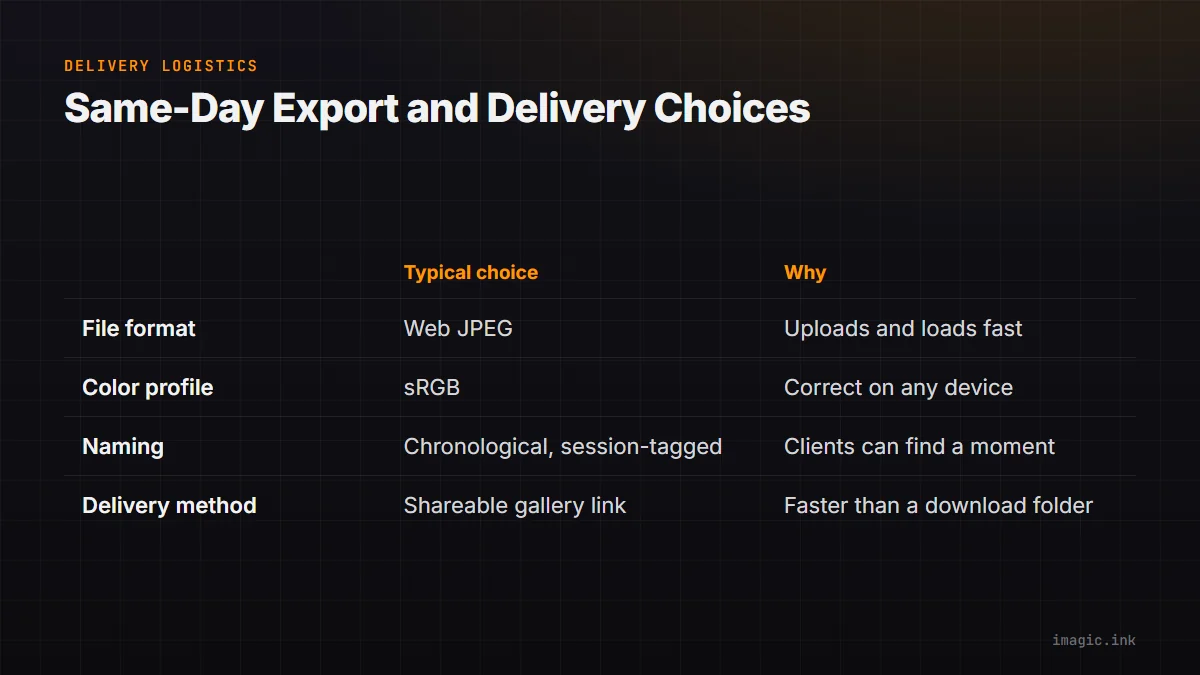
| Decision | Typical same-day choice | Why |
|---|---|---|
| File format | JPEG at web-friendly resolution | Smaller files upload and load faster for a same-day gallery; full-resolution TIFF or RAW originals can follow later if needed |
| Color profile | sRGB | Universally correct rendering across phones, laptops, and social sharing, where most same-day viewing happens |
| Naming and sequence | Chronological, session-tagged filenames | Makes it possible for clients to find a specific moment without a search feature |
| Delivery method | A shareable online gallery link sent by text or email | Faster to distribute than a download folder, and works on mobile without a file manager |
Exporting in batches as each edited group is finished, rather than waiting for the entire shoot to be edited before exporting anything, means a partial gallery can go live while the last sessions are still being culled. Clients rarely need every image delivered simultaneously; a rolling gallery that fills in through the evening often satisfies the same-day expectation better than one large delivery at midnight.
A Realistic Same-Day Timeline
The exact numbers vary by event size and photographer, but the shape of a workable same-day timeline for a full-day conference tends to follow the same pattern: offload and cull the morning sessions during the lunch break, offload and cull the afternoon sessions as soon as the event wraps, batch edit each lighting group as it is culled rather than waiting for everything, and export and share on a rolling basis through the evening rather than all at once.
The photographers who consistently hit same-day turnaround are rarely the ones editing individual frames faster than everyone else. They are the ones who removed steps from the process entirely: less manual duplicate-scrubbing, fewer individually hand-tuned frames, and a delivery method that does not require the whole shoot to be finished before the first images reach the client.
When Same-Day Delivery Is the Wrong Goal
Not every event benefits from same-day pressure, and it is worth being honest with clients about the tradeoff. A same-day gallery is, almost by definition, a lighter editorial pass than a delivery with a week of turnaround. If the brief calls for heavily retouched hero images, extensive color grading, or a curated small set rather than a broad usable gallery, promising same-day delivery on the full shoot can work against the quality the client actually wants. Many event photographers solve this by explicitly offering two deliverables: a fast, broad same-day gallery for immediate sharing, and a smaller, more polished set delivered on a normal timeline for print or marketing use. Setting that split up front, rather than trying to same-day everything, tends to produce happier clients than a rushed single delivery.
Same-Day Delivery Across Different Event Types
The same general approach applies across event types, but the pressure points shift depending on what is being photographed.
- Corporate conferences and trade shows. High frame volume across many separate sessions, each with its own lighting setup, is the defining challenge. Grouping the keeper set by session and lighting zone before batch editing is the single highest-leverage step here.
- Galas and awards dinners. Lower frame volume than a full conference, but often a hard cutoff (the client wants a recap gallery live before guests leave), which makes rolling export through the evening more valuable than trying to deliver everything at once at the very end.
- Sports and tournament coverage. Extremely high burst volume from continuous shooting during play, similar in shape to the burst-heavy problem covered in a look at RAW culling speed across different tools. Duplicate grouping matters more here than almost any other event type, since a single play can generate dozens of near-identical frames.
- Weddings with a same-day highlight request. Usually the smallest frame count of the group but the highest editorial bar, since these images often go straight to social media that evening. A tighter, more selective cull matters more than raw speed here.
Real estate shoots share a related problem even though they are not events in the traditional sense: a hard same-day or next-day delivery expectation from agents combined with a batch of visually similar rooms that all need a consistent look fast. The workflow patterns covered in a guide to editing real estate photography quickly line up closely with the batching approach described above.
Frequently asked questions
How many photos can realistically be delivered same-day from a full-day event?
It depends heavily on event size and crew, but the more useful question is which photos need to go out same-day rather than how many. A broad, lightly edited gallery of the day's key moments delivered same-day, paired with a smaller polished set delivered later, is a more sustainable target than trying to fully finish every frame from an 8-hour event by midnight.
Does same-day delivery require sacrificing photo quality?
It requires sacrificing the amount of individual, frame-by-frame retouching, not the technical correctness of the images. Consistent white balance and exposure applied in batches across a well-culled set can still look clean and professional; the tradeoff is fewer hand-finished hero shots on the same-day timeline, with those saved for a follow-up delivery.
What is the single biggest time sink in a same-day event workflow?
Manually reviewing near-duplicate burst frames one at a time is usually the biggest bottleneck, more so than the actual editing. Grouping bursts and duplicates automatically so the photographer only reviews the strongest candidate from each moment removes the majority of that time before editing even starts.